# Automate AI Maturity

To configure your Cortex workspace for AI Maturity, we recommend the following actions:

* **Connect Data**: [Ingest data and ensure ownership](#step-1-ingest-data-and-solve-ownership) is assigned to your entities
* **Standardize**: [Configure a Scorecard](#step-2-configure-a-scorecard-for-production-readiness) to enforce standards for your AI tools
* **Streamline**: Automate AI tooling requests via Workflows, and streamline your abilities to obtain information from Cortex using Cortex MCP
* **Improve**: [Review Eng Intelligence metrics](#step-5-review-and-act-on-eng-intelligenc) and look for trends relating to AI tool usage

## Use Cortex features to drive AI Maturity

Expand the tiles below to learn about configuring Cortex features to drive AI Maturity.

<details>

<summary><strong>Step 1: Ingest data and solve ownership</strong> <span data-gb-custom-inline data-tag="emoji" data-code="1f50c">🔌</span></summary>

{% hint style="success" %}
**Action Items:**

* [**Import your data**](/ingesting-data-into-cortex/overview.md)
* [**Ensure ownership is set**](/ingesting-data-into-cortex/entities-overview/entities/ownership.md)
* [**Configure integrations**](/ingesting-data-into-cortex/integrations.md)
  {% endhint %}

For AI initiatives to succeed, it is crucial to import your services, resources, infrastructure, and other entities, and to have clear visibility into the ownership of your entities.&#x20;

Connecting your entities to Cortex establishes a single source of truth across your engineering organization. It enables the ability to get timely information from Cortex MCP, track progress via Scorecards, automate Workflows, and gain insights from Eng Intelligence.&#x20;

In addition to the built-in entity types that Cortex supports, you can [create custom entity types](/ingesting-data-into-cortex/entities-overview/entities/adding-entities/entity-types.md) to represent your AI-related entities. For example, you might want to create a type called "AI Models" to categorize models.

<figure><img src="/files/wvK3FxFDwsBH1WbesLgy" alt=""><figcaption></figcaption></figure>

Setting ownership of entities ensures that every service and system is clearly linked to accountable teams or individuals, enabling faster incident response, reducing handoff friction, and making it possible to enforce standards consistently. &#x20;

#### Relevant integrations

To focus on driving AI Maturity, Cortex recommends integrating with tools that provide visibility and control over code, deployments, monitoring, on-call, and documentation. This allows you to see the impact that AI tooling has on efficiency across engineering processes.

Make sure you have configured integrations for the following categories:

* **Version control**: [Azure DevOps](/ingesting-data-into-cortex/integrations/azuredevops.md), [Bitbucket](/ingesting-data-into-cortex/integrations/bitbucket.md), [GitHub](/ingesting-data-into-cortex/integrations/github.md), [GitLab](/ingesting-data-into-cortex/integrations/gitlab.md)
  * Observe metrics like PR size, review times, and merge frequency to see if AI is accelerating workflows
* **Project management**:  [GitHub](/ingesting-data-into-cortex/integrations/github.md), [Jira](/ingesting-data-into-cortex/integrations/jira.md), [Azure DevOps](/ingesting-data-into-cortex/integrations/azuredevops.md), [ClickUp](/ingesting-data-into-cortex/integrations/clickup.md)
  * Compare lead time for AI-influenced work items vs. traditional work
* **External docs**: Cortex also recommends [linking to runbooks and documentation](/ingesting-data-into-cortex/entities-overview/entities/external-docs.md) for your entities, ensuring your users have access to critical information.
  * Use Scorecards to ensure that your entities contain external docs links to AI diagnostics.

With your data in Cortex, you have a jumping-off point to start driving AI maturity.

</details>

<details>

<summary><strong>Step 2: Configure Scorecards to track AI adoption and standards</strong> <span data-gb-custom-inline data-tag="emoji" data-code="1f4cb">📋</span></summary>

{% hint style="success" %}
**Action Item:** [**Create a Scorecard**](/standardize/scorecards/create.md) **for AI Maturity**
{% endhint %}

Scorecards automate the process of checking whether services meet criteria for your AI Maturity goals.\
\
Cortex's AI Maturity template includes a set of predefined rules which can be customized based on your organization's requirements, infrastructure, and goals. It is structured into three levels — Bronze, Silver, and Gold — with each representing increasing levels of AI Maturity.&#x20;

The Scorecard template contains rules that check for industry best practices, such as verifying that AI tool instructions and rules are in your repositories.

#### Step 2.1: Create the Scorecard and configure the basics

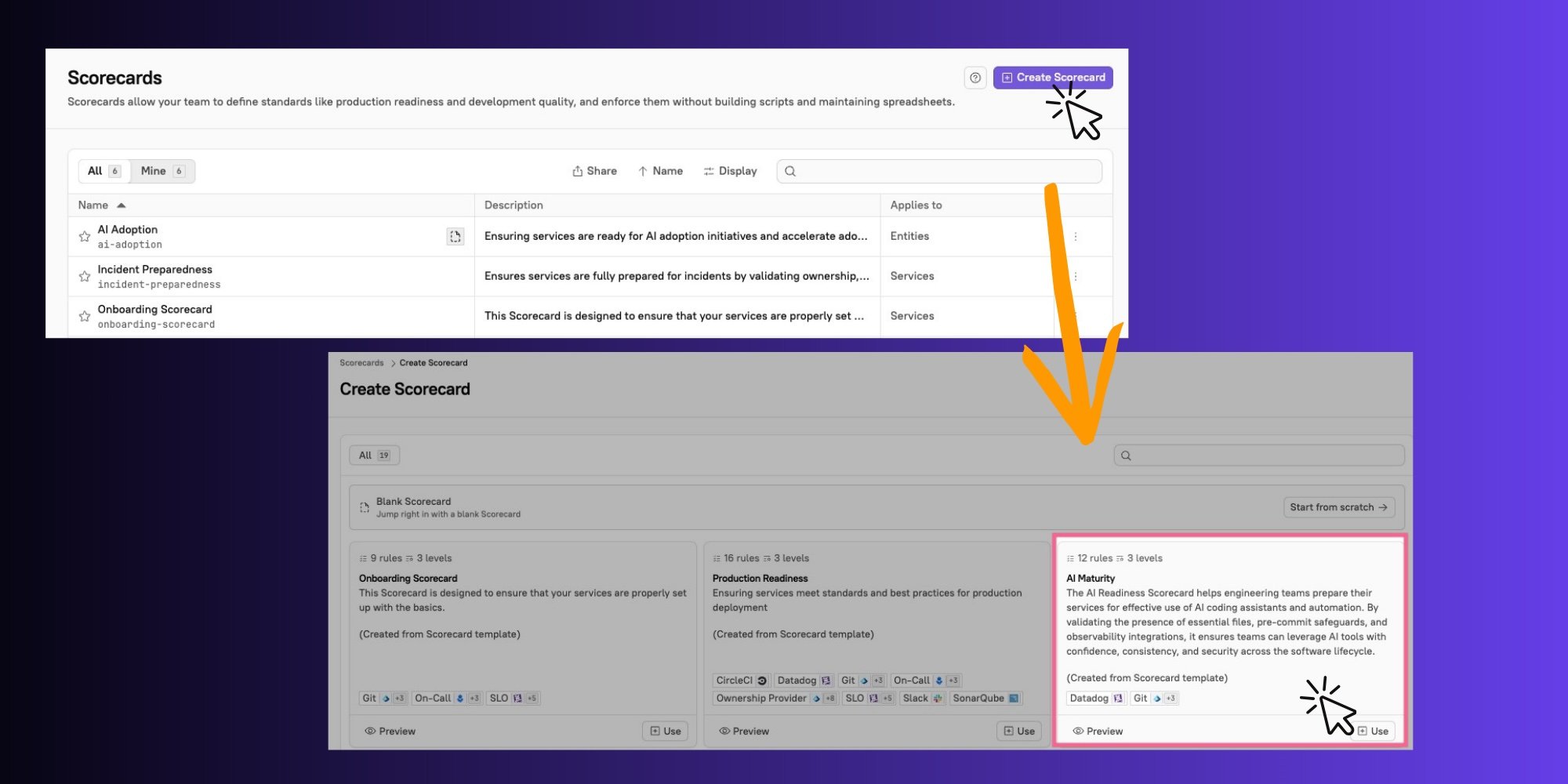
1. On the [**Scorecards** page](https://app.getcortexapp.com/admin/scorecards) in your workspace, click **Create Scorecard**.
2. On the `AI Maturity` template, click **Use**. <br>

   <figure><img src="/files/pQAdPCHJumTkM14idkGs" alt="Click Create Scorecard, then select the AI Maturity Scorecard."><figcaption></figcaption></figure>
3. Configure basic settings, including the Scorecard's name, unique identifier, description, and more.
   * Learn about configuring the basic settings in the [Creating a Scorecard documentation](/standardize/scorecards/create.md).

#### Step 2.2: Review and modify the rules

While Cortex's template is based on common industry standards, you may need to adjust the rules based on which tools you use and how your organization prioritizes standards and requirements. You can reorder, delete, and edit rules, you can add more rules to a level, and you can assign more points to a rule to signify its importance.

When adding or changing the template rules, you can select from a list of available pre-built rules. Behind each rule is a [Cortex Query Language (CQL) ](/standardize/cql.md)query; you can also write your own queries to further refine your rules.&#x20;

</details>

<details>

<summary><strong>Step 3: Automate processes via Workflows</strong> <span data-gb-custom-inline data-tag="emoji" data-code="2699">⚙️</span></summary>

{% hint style="success" %}
**Action item:** [**Configure Workflows**](/streamline/workflows.md)
{% endhint %}

You can use Workflows to streamline and standardize processes relating to your AI adoption initiatives.

#### Workflow to automate AI tool requests

You can use Workflows to automate the process of requesting access to AI tools. See an example Workflow for automating GitHub Copilot access in [Dev onboarding: User access to Copilot](broken://spaces/JW7pYRxS4dHS3Hv6wxve/pages/dyOiPs79oZDoGINSsawI).

#### Workflows to establish adherence to best practices

* When Scaffolding new services, you can use templates to ensure that every new service starts with baseline standards (e.g., runbooks include AI-driven diagnostics, services integrate AI-based anomaly detection, etc.).&#x20;
  * See the documentation on [registering a Scaffolder template](/streamline/workflows/scaffolder.md) and [configuring a Scaffolder block](/streamline/workflows/blocks.md#scaffolder).

</details>

<details>

<summary><strong>Step 4: Configure Cortex MCP</strong> <span data-gb-custom-inline data-tag="emoji" data-code="1f916">🤖</span></summary>

{% hint style="success" %}
**Action Item:** [**Configure Cortex MCP**](/get-started/mcp.md)
{% endhint %}

[Cortex MCP](/get-started/mcp.md) can significantly help boost efficiency by providing instant, conversational access to critical service and team information directly from your MCP client. Including adoption of Cortex MCP in your AI initiatives helps your team move faster:

* **It provides real-time, structured answers**: Ask questions like "Who is on call for backend-server?" or "Give me all the details for parser-service." MCP fetches the data in real time from Cortex's API, ensuring accurate and up-to-date information about service health, ownership, and operational readiness.
* **It gives you quick access to your centralized data**: Efficiency goals can be slowed down by uncertainty over who owns models, pipelines, and other AI services. Use the MCP to quickly find out which teams are accountable for each tool in your environment.
* **It enables quick access to Scorecard details**: If you implement Scorecards to measure AI-related initiatives, you can use the MCP to understand quickly how healthy your services are and how you can improve scores.

</details>

<details>

<summary><strong>Step 5: Review Eng Intelligence metrics attributable to AI</strong> <span data-gb-custom-inline data-tag="emoji" data-code="1f4c8">📈</span></summary>

{% hint style="success" %}
**Action Items:**&#x20;

* [**Review Eng Intelligence metrics**](/improve/eng-intelligence.md) **and establish baselines.**
* [**Configure a user label**](/improve/eng-intelligence/eng-intelligence.md#group-by-user-label) **to identify teams using AI tools.**
  {% endhint %}

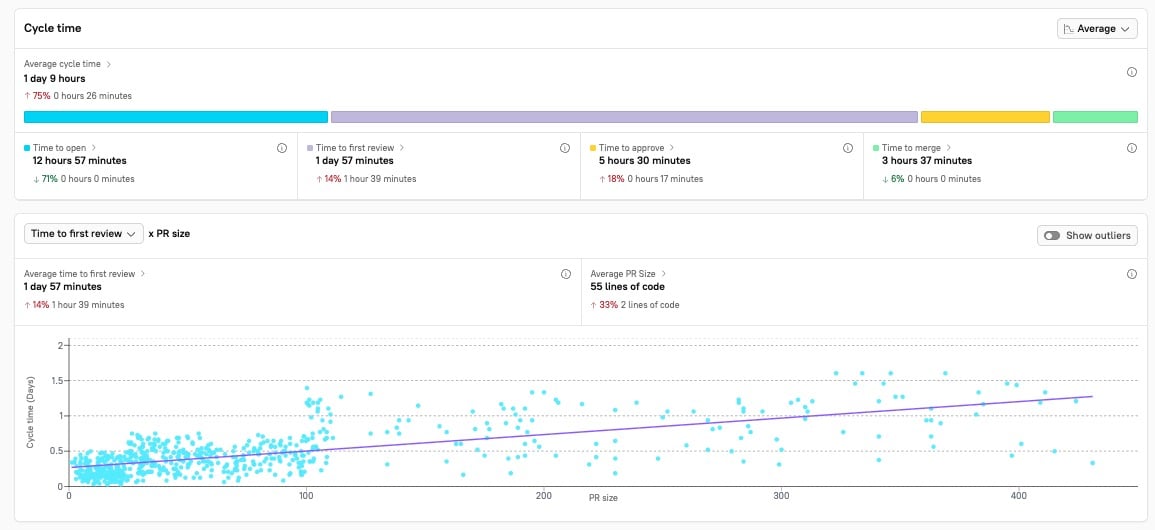
Use Eng Intelligence features — the [DORA dashboard](/improve/eng-intelligence/dashboards/dora-dashboard.md), [Velocity Dashboard](/improve/eng-intelligence/dashboards/velocity-dashboard.md), and [Metrics Explorer](/improve/eng-intelligence/metrics-explorer.md)  —  to understand how well teams are performing before and after AI initiatives have been implemented.

<figure><img src="/files/hKWjA2IrZMv4MweKoNpz" alt="Review trends in Eng Intelligence graphs and metrics." width="563"><figcaption></figcaption></figure>

Review baselines in areas such as incident frequency and time to resolution, and review the trends over time as AI initiatives (such as AI-assisted coding) are adopted.&#x20;

This visibility helps leaders prove ROI and justify further investment in AI tooling, while also giving insight into where teams can improve efficiency across the software development lifecycle.

#### Create user labels

If you have some teams who are adopting AI tools before others, you can apply [user labels](/improve/eng-intelligence/eng-intelligence.md#group-by-user-label) to those teams. User labels allow you to group users into cohorts to analyze metrics based on different factors. Compare metrics between engineers who use AI tools and those who don't to understand the value that AI tools provide.

</details>

## AI Maturity in action

Learn about what ongoing AI Maturity looks like in [AI Maturity in action](/solutions/ai-maturity/in-action.md).


---

# Agent Instructions: Querying This Documentation

If you need additional information that is not directly available in this page, you can query the documentation dynamically by asking a question.

Perform an HTTP GET request on the current page URL with the `ask` query parameter:

```
GET https://docs.cortex.io/solutions/ai-maturity/configure.md?ask=<question>
```

The question should be specific, self-contained, and written in natural language.
The response will contain a direct answer to the question and relevant excerpts and sources from the documentation.

Use this mechanism when the answer is not explicitly present in the current page, you need clarification or additional context, or you want to retrieve related documentation sections.