> For the complete documentation index, see [llms.txt](https://docs.cortex.io/llms.txt). Markdown versions of documentation pages are available by appending `.md` to page URLs; this page is available as [Markdown](https://docs.cortex.io/resources/help.md).
# Further help
Whether you're just getting started with Cortex or looking to deepen your expertise, we offer several ways to find answers, build skills, and stay in the loop. This article walks through four resources that extend beyond our standard help articles: **AI Docs Assistant**, **Cortex Academy**, **Cortex Blog**, and **Cortex Professional Services**.
## AI Docs Assistant
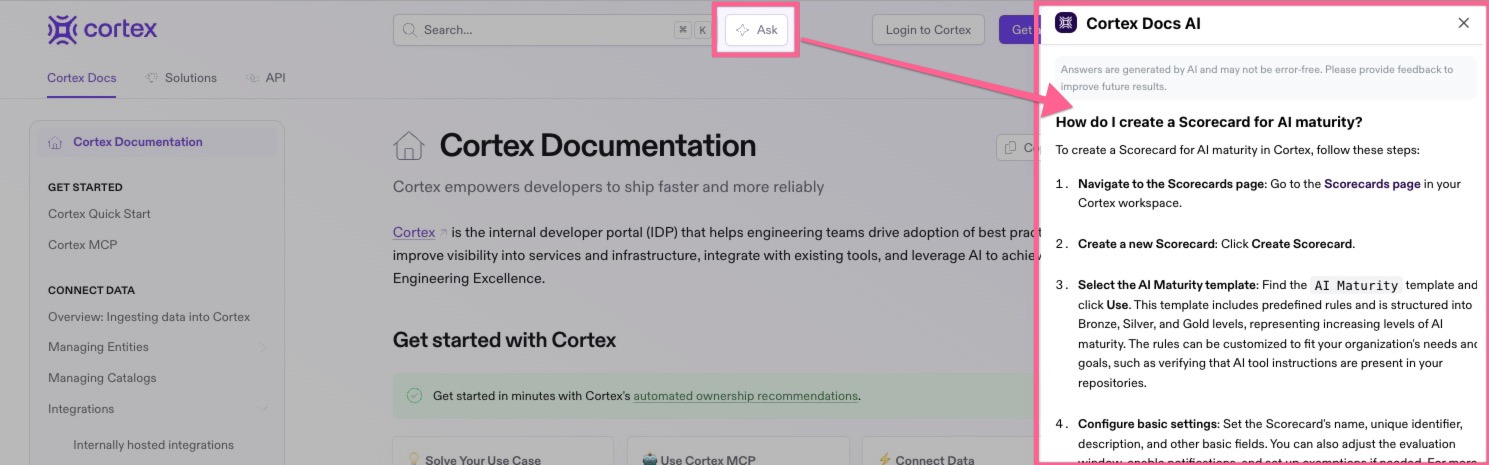
The AI Docs Assistant, powered by Kapa, is your fastest path to an answer. It's a conversational assistant trained on the Cortex documentation, so instead of searching through articles, you can simply ask a question and get a direct response with links to the relevant docs.
**Where to find it:**
* **In the help center** - At the top of the docs, click **Ask**, or use the keyboard shortcut `CMD+K` to open the AI Docs Assistant. Ask questions in natural language and get instant, accurate answers.
* **In Cortex** - Click **Search** (or use `CMD+K`), then click the **Ask AI icon** :sparkles:. Type in a question and get answers without having to leave Cortex.
**What it's great for:**
* Quick how-to questions, e.g. ***How do I set up a Scorecard?***
* Troubleshooting common issues
* Understanding a feature before you dive in
* Pointing you to the right doc when you're not sure where to look
The AI Docs Assistant works best when you ask specific, focused questions. If you need a step-by-step walkthrough or want to validate a complex configuration, follow the doc links it provides for the full context.
## Cortex Academy
[Cortex Academy](https://academy.cortex.io/) is our learning management system (LMS), built for teams who want structured, hands-on training. Whether you're a brand-new admin standing up Cortex for the first time or a power user looking to master advanced features, the Academy has a course for you.
**What you'll find:**
* **Role-based learning paths** - Curated tracks for admins, developers, platform engineers, and engineering leaders.
* **Self-paced courses** - Work through lessons on your own schedule, with progress saved as you go.
* **Hands-on exercises** - Apply what you learn in guided scenarios that mirror real Cortex workflows.
* **Certifications** - Earn credentials that demonstrate your Cortex expertise to your team and the broader community.
The Academy is a great option when you want to go beyond "how do I do this one thing" and build a deeper, more durable understanding of the platform. Many customers roll the Academy into their onboarding process for new engineers joining a Cortex-powered organization.
{% hint style="success" %}
Looking for a quick introduction to Cortex? Check out the [Cortex 101 video](https://academy.cortex.io/learn/video/cortex-101).
{% endhint %}
## Cortex Blog
The [Cortex Blog](https://www.cortex.io/blog) is where we share what's new, what we're learning, and what's working for the engineering teams we partner with. It's the best place to stay current between product releases and to pick up ideas from the broader EngOps community.
**What we publish:**
* **Engineering insights** - Deep dives on developer experience, platform engineering, service ownership, and the practices behind high-performing engineering organizations.
* **Product updates** - Release notes, feature announcements, and previews of what's coming next.
* **Best practices** - Tips, patterns, and customer stories that show how teams are getting the most out of Cortex.
If you want to keep a pulse on Cortex without checking back manually, subscribe to the blog or follow us on LinkedIn for new posts as they go live.
## Cortex Professional Services
To ensure a smooth implementation, partner with Cortex Professional Services (PS) for expert guidance and hands-on assistance with data modeling, entity ownership, and more. Reach out to to learn how we can support your implementation and adoption journey.
## Choosing the right resource
Each of these resources serves a different need:
* **Have a quick question right now?** Start with the AI Docs Assistant.
* **Want to build real expertise?** Enroll in Cortex Academy.
* **Curious what's new or how others are doing it?** Browse the Cortex Blog.
* **Looking for guided implementation?** Reach out to Cortex Professional Services.
Our [help center articles](https://docs.cortex.io) remain the source of truth for detailed product documentation. And if you can't find what you need across any of these channels, our support team is always happy to help!
**Opening a support ticket:**
* **In Cortex** - From the main sidebar, click your avatar in the bottom-left corner. Click **Help & docs**. Select **Submit a request**.
* **In Customer Portal** - Go to [https://support.cortex.io](https://support.cortex.io/).
* **In Slack** - If your organization has a connected Slack channel, a support workflow is automatically added to your account. To reach our team, either mention '@CortexTechnicalSupport' or add a `:ticket:` reaction to any message, and the team will respond directly in the thread.
* **In Microsoft Teams** - If your organization has a shared Microsoft Teams channel with Cortex, a support workflow is automatically added to your account. To reach our team, add a `:ticket:` reaction to any message and the team will respond directly in the thread.
* **Via Email** - Send a message to .
Don't have a Slack or Microsoft Teams channel set up yet? Reach out to your Customer Success Manager to get one configured.