Prerequisites
Creating a custom entity type is a two-step process:- First, define the entity type itself (its name, icon, and JSON schema)
- Users or API keys must have the
Edit Entity Typespermission
- Users or API keys must have the
- Next, create individual entities of that type via the UI, GitOps, or API.
- Users or API keys must have the
Edit Entitiespermission
- Users or API keys must have the
Creating a custom entity type
Users or API keys with theEdit Entity Types permission can create, edit, and delete entity types.
Custom entity types can be created manually in the Cortex UI or via the API. The type you define— its schema, required fields, and metadata—shape how entities of that type are imported and validated going forward. Once the type exists, you can create entities of that type through the UI, API, or GitOps.
When configuring an entity, you can’t add archived teams as owners or archived entities as dependencies, parents, or children.
Creating a custom entity type manually in the Cortex UI
- From the main sidebar, expand All Catalogs, then select All entities.
- Select the Entity types tab.
- In the upper-right corner, click Create, then select Create new entity type. The Create entity type page opens.
-
In the Details section, do the following:
- Under Entity type name, enter a human-readable name that will appear in the catalog for this entity type (required).
- Under Identifier, enter a unique identifier consisting of letters, digits, and hyphens that corresponds to the entity type (required). This is used to specify the type defined in the YAML definitions for imported entities.
- Under Description, enter a description for the entity type.
- Under Display icon, click Edit to select an icon to appear alongside the entity type throughout Cortex.
-
In the Schema section, do the following:
- Define a JSON schema to be used to validate the
x-cortex-validationblock of a given entity’s YAML.- This can be used to enforce certain attributes about entities, such as a region or version number. Attributes defined in the schema will be required when creating an entity of that type, which can then be validated in Scorecards.
- In the example screenshot below, the custom entity type
Employeerepresents individuals in an organization. The schema requires each entity to include alocation, so every entity of type “Employee” must define the employee’s location.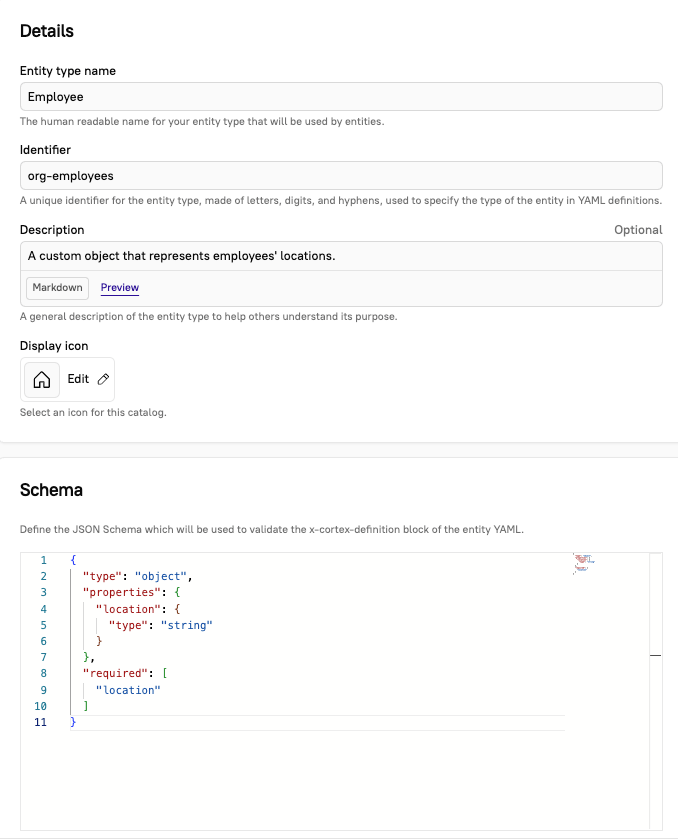
- Define a JSON schema to be used to validate the
- Click Create. The new entity type now appears in the Entity types tab. You can now import entities of the same type into Cortex.
Creating a custom entity type via the API
You can create, update, and delete entity types using the Cortex API. Learn more about the JSON schema.JSON schema for custom entity types
Entity type definitions require a JSON schema that outlines the attributes that entities should conform to. Custom entity type definitions are powered by the open-source JSON Schema project. The JSON schema for a custom entity type ensures consistency and validation when creating entities of that type. The attributes listed underrequired in the schema must be defined for entities of that type according to the outlined properties.
In the example below, location is required when creating this type of entity, but the schema also includes department as a possible property.
| Field | Definition | Required? |
|---|---|---|
type | Type of entity and/or required component: array, boolean, integer, null, number, object, or string | |
required | Required specs for the entity type | |
properties | Properties of the required specs (including type). Required when required is non-empty. | Conditional |
Adding an entity schema for new custom entities
When creating a new entity of the custom type, if the entity type’s JSON schema requires certain attributes, you must include the metadata for those attributes on that entity.Adding attributes via JSON schema
Adding attributes via JSON schema
When creating a custom entity in the Cortex UI, enter the entity’s attribute values as JSON in the Schema field.Using the example above, the schema format looks like:
Adding attributes via YAML
Adding attributes via YAML
For GitOps workflows or direct YAML editing in the Cortex UI, define the custom entity’s metadata in the YAML.Using the example above, the entity YAML looks like:The
x-cortex-type (the custom entity type) and the x-cortex-definition are required when creating a custom entity. Learn more under Create custom entities in the entity descriptor.Metadata in the entity details page
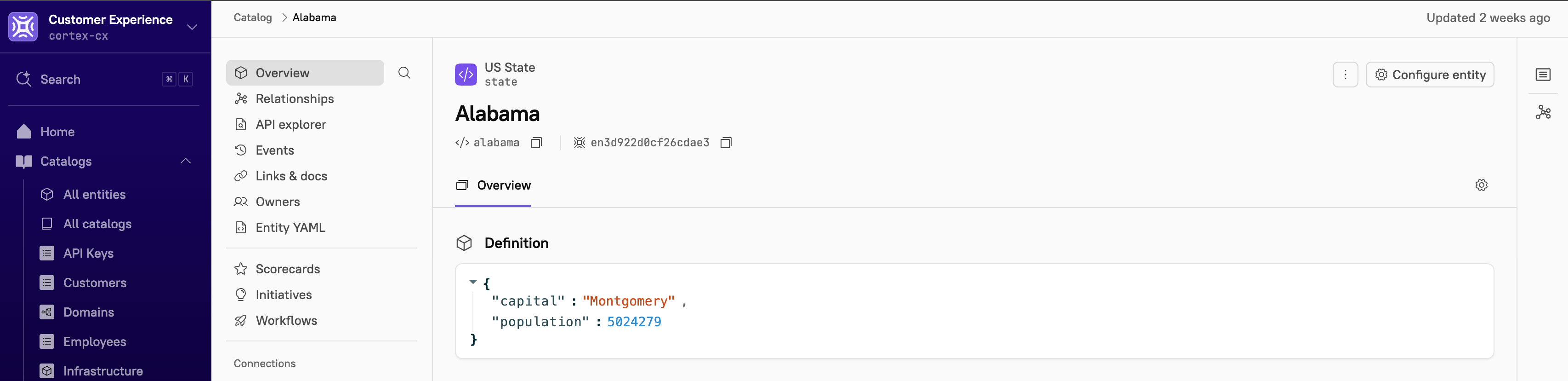
Defining a JSON schema enables visibility on an entity’s details page. The schema and the defined properties appear under the Overview section on the entity’s overview, making it easy for you to identify key specs. In the example below, the entity “Alabama” displays metadata for the propertylocation :