# Archiving entities

Archiving an entity allows you to remove it from active use while preserving its history and context.

You can configure Cortex to automatically archive entities when they are no longer detected in your integrations or when their corresponding YAML files are deleted. We recommend enabling this feature to keep your data up-to-date without manual effort. Learn more in [Auto archiving entities](/configure/settings/entity-settings/auto-archive.md).

It's also possible to manually archive entities in the Cortex UI or via the Cortex API, as described below.

## How to archive and unarchive entities

To archive entities, your user or API key must have the `Archive entities` permission. To unarchive entities, your user or API key must have the `Configure entities` permission.

{% tabs %}
{% tab title="Cortex UI" %}

1. Navigate to an [entity's details page](/ingesting-data-into-cortex/entities-overview/entities/details.md) in Cortex.
2. Click the 3 dots menu at the top of the page, then click **Archive entity**.\ <img src="/files/THQljVWOZAixZUHWYoaQ" alt="" data-size="original">
3. In the confirmation window, click **Archive**.\
   ![](/files/WW6ol9L6TRWnps0HlXfr)

To un-archive an entity:

1. Navigate to the archived [entity's details page](/ingesting-data-into-cortex/entities-overview/entities/details.md) in Cortex.
2. Click the 3 dots menu at the top of the page, then click **Unarchive entity**.
3. In the confirmation window, click **Restore**.
   {% endtab %}

{% tab title="API" %}
See the API documentation on [archiving an entity](/api/readme/catalog-entities.md#put-api-v1-catalog-tagorid-archive) and [unarchiving an entity](/api/readme/catalog-entities.md#put-api-v1-catalog-tagorid-unarchive).
{% endtab %}
{% endtabs %}

## How archived entities are handled in Cortex

Archived entities are not included in the following Cortex features:

* [Scorecards](/standardize/scorecards.md) and [Initiatives](/improve/initiatives.md)
* [Reports](/improve/reports.md)
* [Eng Intelligence](/improve/eng-intelligence.md)
* [Cortex Query Language (CQL) ](/standardize/cql.md)features, including CQL reports and query builder
* [Relationship graphs](/ingesting-data-into-cortex/entities-overview/entities/relationship-graph.md)
* [Workflows](/streamline/workflows.md)

### The "All entities" and Catalogs pages

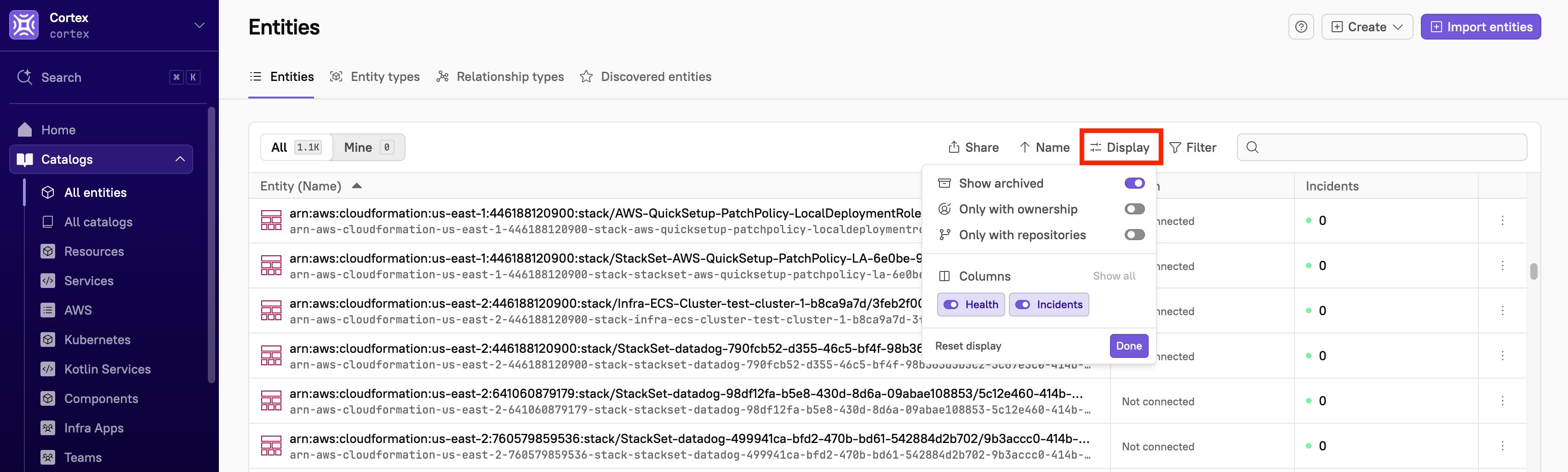
By default, archived entities do not appear in the lists on "All entities" or in catalogs, but you can choose to include archived entities in your view.

To include archived entities:

1. Click **Display** at the top of the list.\
   ![](/files/5eYQ6qHAIc9arUj2ZW1I)
2. Toggle on the setting for **Show archived**.

Note that this setting is not persistent when you navigate away from the page.

### An entity details page

On an [entity's details page](/ingesting-data-into-cortex/entities-overview/entities/details.md), if a related dependency, child entity, or parent entity has been archived, it will not be displayed under **Relationships** in the entity's sidebar.

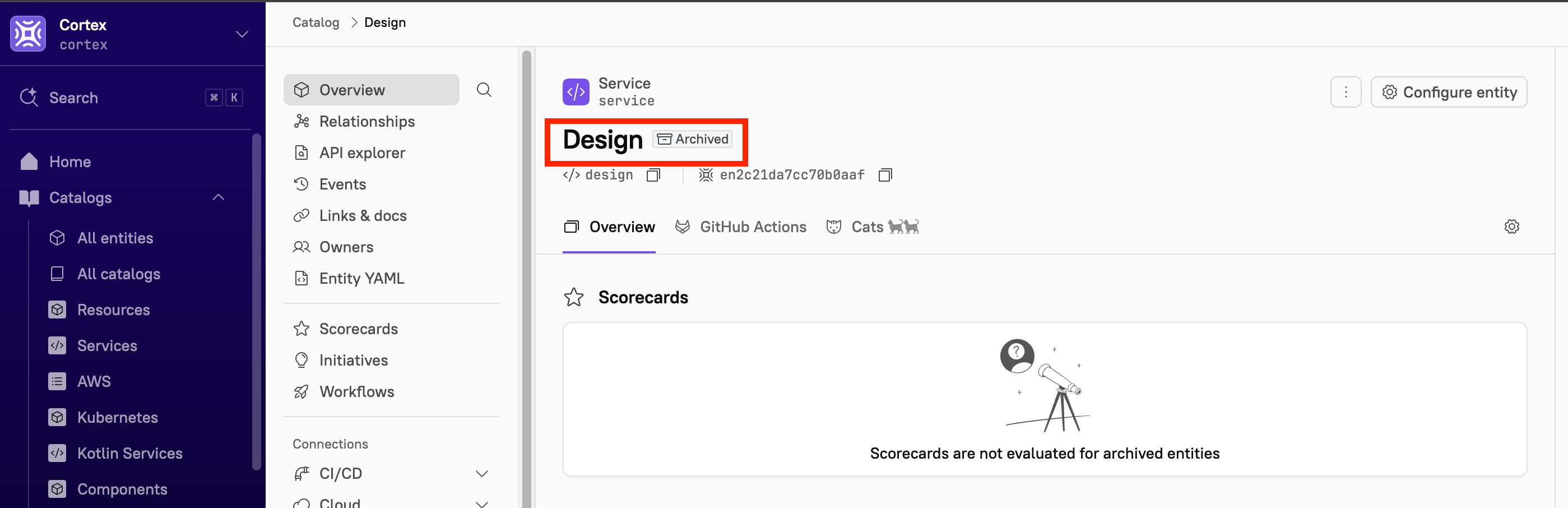
If the entity itself has been archived, you will see an "Archived" flag appear next to its name:

<div align="left"><figure><img src="/files/TlC8aX04XxPvJaG37v47" alt="An archived entity has an &#x22;archived&#x22; label next to its name."><figcaption></figcaption></figure></div>

### Entity configuration

While configuring an entity, you cannot add an archived team as an owner. You cannot add archived entities as dependencies or as parent or child entities.

### The discovered entities list

Cortex will tag detected changes to signify whether an entity or repository has been archived. Learn more in [Viewing discovered entities](/ingesting-data-into-cortex/entities-overview/entities/discovery-audit.md).


---

# Agent Instructions: Querying This Documentation

If you need additional information that is not directly available in this page, you can query the documentation dynamically by asking a question.

Perform an HTTP GET request on the current page URL with the `ask` query parameter:

```
GET https://docs.cortex.io/ingesting-data-into-cortex/entities-overview/entities/archiving-entities.md?ask=<question>
```

The question should be specific, self-contained, and written in natural language.
The response will contain a direct answer to the question and relevant excerpts and sources from the documentation.

Use this mechanism when the answer is not explicitly present in the current page, you need clarification or additional context, or you want to retrieve related documentation sections.