# Adding custom data

Custom data extends the out-of-the-box metadata that Cortex provides via integrations, enhancing your use of catalogs and augmenting details available for your entities. This data can also be used to write CQL queries and [Scorecard rules](/standardize/scorecards.md).

Custom data can be defined manually in the [entity descriptor](#editing-the-entity-descriptor), added to entities programmatically via a [REST API](#adding-custom-data-via-the-cortex-api), or sent through a webhook. To learn about sending data via webhook, see [Custom webhook integrations](/ingesting-data-into-cortex/integrations/webhook.md).

### Custom data vs. Custom metrics

Cortex also offers a [custom metrics feature for Eng Intelligence](/improve/eng-intelligence/custom-metrics.md). Note the following differences between custom data and custom metrics:

* **Custom data** should be used when you need to attach static or slowly changing metadata to entities, such as deployment environments, compliance statuses, or other descriptive attributes. It is best for enriching entity details, reporting, and Scorecard rules based on entity attributes. Learn more below in [Use cases](#use-cases).
  * It is not ideal for tracking dynamic or time-sensitive information, as new data will overwrite previous values for the same key.
* **Custom metrics** should be used to track time series or trending data, such as incident counts, SLOs, or any metric that changes over time and needs to be visualized in charts or analyzed in Eng Intelligence. Learn more in [Custom metrics](/improve/eng-intelligence/custom-metrics.md).
  * Custom metrics are designed for analytics and can be used in dashboards, entity pages, and Scorecards.

## Defining custom data

There are a few ways you can add custom data to an entity:

* In the entity descriptor
  * This is optimal for low-volume, human-maintained data because it requires updating the entity's YAML when the data changes.
* Via a `POST` REST API endpoint
  * Using a [REST API](#api) is a better option for data that comes from an automated process, like a CI/CD pipeline.
* A [webhook](/ingesting-data-into-cortex/integrations/webhook.md).
  * This can be done without auth or an explicit [Cortex tag](/ingesting-data-into-cortex/entities-overview/entities.md#cortex-tag) in the URL if you do not have access to the Cortex tag or the ability to add authentication headers.

{% tabs %}
{% tab title="Entity descriptor" %}
**Editing the entity descriptor**

{% hint style="info" %}
Learn more about [entity YAML descriptors](/ingesting-data-into-cortex/entities-overview/entities.md#defining-entities-via-yaml-file) in the Managing entities documentation.
{% endhint %}

The simplest way to describe information in the YAML is to define an object.

```yaml
x-cortex-custom-metadata:
  key-example: value-example
  arbitrary-custom-data: hippocampus
  regions-of-brain:
    value: 3
    description: cerebrum, cerebellum, brainstem
  cognition: true
```

| Field   | Description                                                                                    | Required |
| ------- | ---------------------------------------------------------------------------------------------- | :------: |
| `key`   | Key or title for the custom data. Anything defined **before** the `:` will serve as the `key`. |   **✓**  |
| `value` | Value for the custom data. Anything defined **after** the `:` is the `value`.                  |   **✓**  |

Custom data can be of any type, including scalars (strings, numbers, booleans), objects, and lists.

When you add custom data to an entity's YAML, you'll see the `key` and `value` pairs on an entity's **Custom data** page.

Custom data added via entity descriptor will display with a `YAML` tag.

**Adding descriptions**

You can add a description to data by explicitly defining it along with the `key` and `value` pairs. While `key` and `value` pairs can be defined with any terms when a description is not added, `value:` must explicitly be defined when a description is included.

```yaml
x-cortex-custom-metadata:
  regions-of-brain:
    value: 3
    description: cerebrum, cerebellum, brainstem
  brain-hemispheres:
    value: 2
    description: The brain has a left and a right hemisphere.
```

| Field         | Description                                                                                    | Required |
| ------------- | ---------------------------------------------------------------------------------------------- | :------: |
| `key`         | Key or title for the custom data. Anything defined **before** the `:` will serve as the `key`. |   **✓**  |
| `value`       | Value for the key; should be defined explicitly with `value:`                                  |   **✓**  |
| `description` | Description of the custom data                                                                 |   **✓**  |

Note: While the `description` field is always optional, it is technically "required" to add a description to custom data.
{% endtab %}

{% tab title="API" %}
**Adding custom data via the Cortex API**

You can pipe custom data directly into Cortex by `POST`ing to `/api/v1/catalog/{tag}/custom-data` where `{tag}`is the `x-cortex-tag` for a given entity.

The request body requires the following in JSON format:

| Field         | Type   | Description                      | Required |
| ------------- | ------ | -------------------------------- | :------: |
| `key`         | string | Key or title for the custom data |   **✓**  |
| `value`       | object | Value for the custom data        |   **✓**  |
| `description` | string | Description of the custom data   |          |

See the [API docs ](/api/readme/custom-data.md)for authentication details.

If a key has already been set through the [entity descriptor](#editing-the-entity-descriptor), an API call will **NOT** overwrite the existing value. Instead, it will simply return the existing value.

{% hint style="warning" %}
If a `key` is defined in the entity descriptor, the API cannot override the key. You'll see `YAML` as the `source` value in the response body if you encounter this situation.
{% endhint %}

To explicitly overwrite values set in the YAML file, use the `force=true` flag as a query parameter.

{% hint style="info" %}
If you find yourself using the `force` flag, it may be better to remove the field from the YAML file or update the value in the `cortex.yaml` file instead to maintain the source of truth.
{% endhint %}

Custom data added via API will display with a `API` tag.

**Bulk upload entity keys**

You can use the bulk upload endpoint to upload multiple keys for one or more entities.

`PUT` data in the following format to `/api/v1/catalog/custom-data`:

```json
{
  "values": {
    "<entity-tag>": [
      {
        "key":"example-key",
        "value":"example value",
        "description":"A description of these data."
      }
    ],
    "<another-entity-tag>": [
      {
        "key":"example",
        "value":{
          "my-data":"my-value",
          "complex": "data",
          "v": 0
        }
      }
    ]
  }
}
```

You can include multiple `key` and `value` objects for each tag. The object conforms to the same shape as the single upload API.
{% endtab %}

{% tab title="Webhook" %}
Learn more in [Custom webhook integrations](/ingesting-data-into-cortex/integrations/webhook.md).
{% endtab %}
{% endtabs %}

### Data source hierarchy

Cortex applies a data source hierarchy to determine how to handle a case where the same `key` is defined from multiple sources.

* The [entity descriptor](#editing-the-entity-descriptor) is the source of truth. If a key is defined there, the API or webhooks cannot override the key.
* The [API](#adding-custom-data-via-the-cortex-api) and [webhook](#webhook) approaches are at the same level and can override each other.

You can override keys defined in the YAML by adding a `force=true` parameter when using an API, but when the entity descriptor is eventually re-processed, the data provided via the API will be overwritten.

## Use cases

### Cataloging

Catalogs contain a lot of useful metadata about entities, including ownership and data from integrations. However, you may have your own custom fields that you want to include that would make exploring the catalog easier.

These can include things like:

* Which AWS zones is this deployed in?
* What databases does the entity consume?
* When was the last successful CI run?

{% hint style="success" %}
If the answers to these questions fit a pre-enumerated list, consider using [groups](/ingesting-data-into-cortex/entities-overview/entities/groups.md). Groups are displayed on entity detail pages and can easily be applied in catalog filters.

Custom data for cataloging makes the most sense when the data is more flexible.
{% endhint %}

Custom data can then be queried against by using the [Query builder](/standardize/cql.md#the-query-builder-tool), explored with [CQL reports](/standardize/cql/cql-reports.md), or viewed on an [entity's details page](/ingesting-data-into-cortex/entities-overview/entities/details.md).

### Scorecards

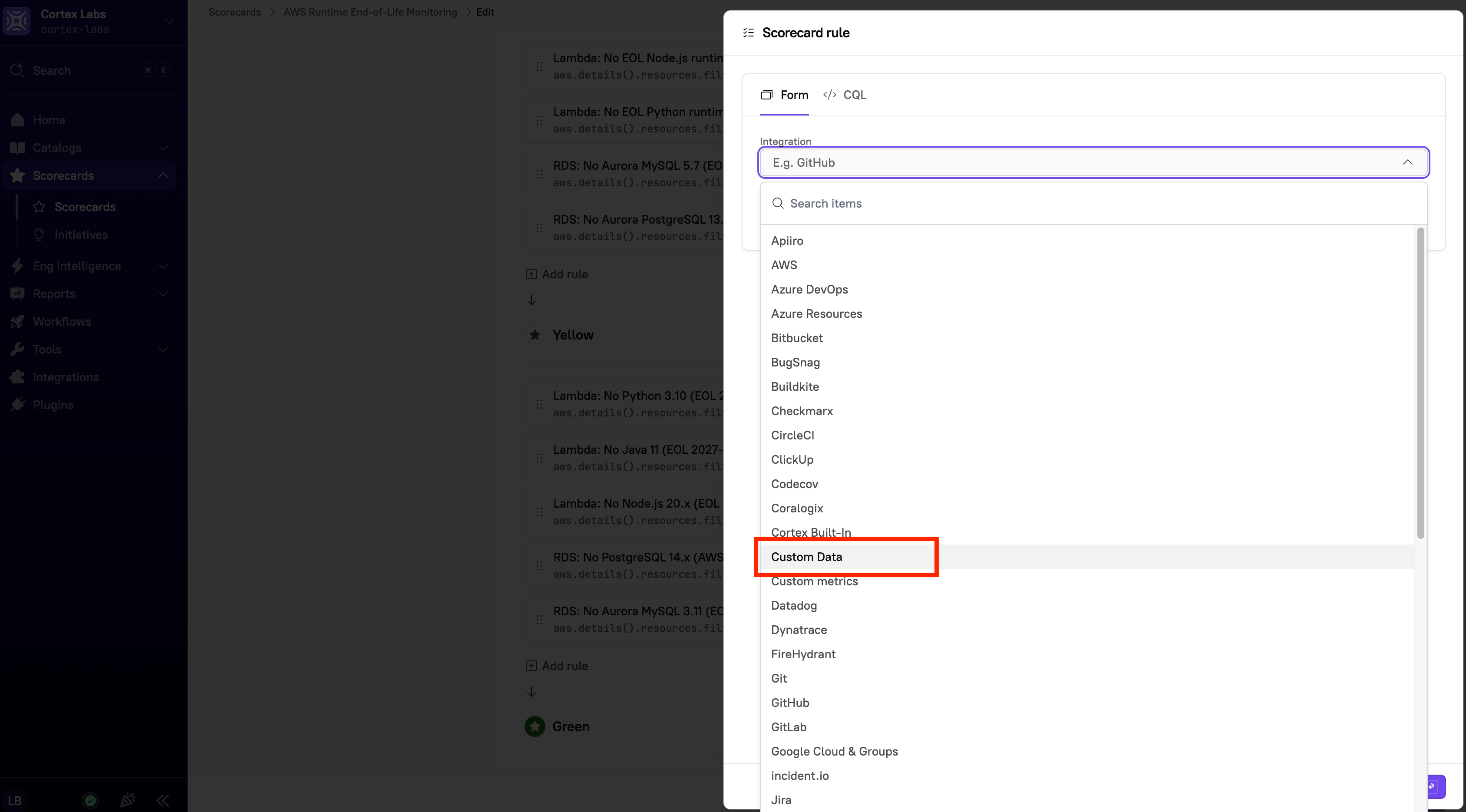
Cortex makes it easy to write [Scorecard rules](/standardize/scorecards.md) based on custom data that exists in your catalogs. When adding a rule, you can select **Custom data** from **Choose an integration** in the form editor and follow the flow. Cortex will automatically supply variables based on the custom data you've defined.

{% hint style="success" %}
Using the [custom data API](/api/readme/custom-data.md) to push data into Cortex and extend your Scorecards. You can send entire JSON payloads and use `jq` to process them in a Scorecard, or use it as an input to a custom `OPA Policy` as a Scorecard rule.
{% endhint %}


---

# Agent Instructions: Querying This Documentation

If you need additional information that is not directly available in this page, you can query the documentation dynamically by asking a question.

Perform an HTTP GET request on the current page URL with the `ask` query parameter:

```
GET https://docs.cortex.io/ingesting-data-into-cortex/entities-overview/entities/custom-data.md?ask=<question>
```

The question should be specific, self-contained, and written in natural language.
The response will contain a direct answer to the question and relevant excerpts and sources from the documentation.

Use this mechanism when the answer is not explicitly present in the current page, you need clarification or additional context, or you want to retrieve related documentation sections.