> For the complete documentation index, see [llms.txt](https://docs.cortex.io/llms.txt). Markdown versions of documentation pages are available by appending `.md` to page URLs; this page is available as [Markdown](https://docs.cortex.io/ingesting-data-into-cortex/entities-overview/entities/deploys.md).

# Adding deployment data via API

Getting deployment data into Cortex is critically important for both engineering insights and organizational success. It enables the use of [Eng Intelligence](/improve/eng-intelligence.md) to assess [DORA metrics](/improve/eng-intelligence/dashboards/dora-dashboard.md) and other KPIs to understand how quickly and efficiently your teams are shipping code. Deployment data also gives you the insight needed to create [Scorecards](/standardize/scorecards.md) and [Initiatives](/improve/initiatives.md) that promote process improvement across teams.

## Adding deployment data to Cortex

To get deployment data into Cortex, you must use the [Add deployment for entity](/api/readme/deploys.md) API endpoint.

### Deploy data pipeline examples

In these examples, the repository secret or variable contains a valid [Cortex API key](/configure/settings/api-keys.md), and the repository name matches the [Cortex tag](/ingesting-data-into-cortex/entities-overview/entities.md#cortex-tag).

<details>

<summary>GitHub Action</summary>

In this example, a repository secret called `CORTEX_TOKEN` contains a valid Cortex API key.

```yaml
name: Build and Deploy with Status Updates

on:
  push:
    branches: [ main, develop ]
  pull_request:
    branches: [ main ]

env:
  CORTEX_API_URL: "https://api.getcortexapp.com/api/v1/catalog"
  PROJECT_NAME: "my-application"

jobs:
  build-and-deploy:
    runs-on: ubuntu-latest
    
    steps:
    - name: Checkout code
      uses: actions/checkout@v4
    
    - name: Validate Cortex token
      run: |
        if [ -z "${{ secrets.CORTEX_TOKEN }}" ]; then
          echo "ERROR: CORTEX_TOKEN secret not configured"
          exit 1
        fi
    
    - name: Setup Node.js
      uses: actions/setup-node@v4
      with:
        node-version: '18'
        cache: 'npm'
    
    - name: Install dependencies
      run: npm ci
      
    - name: Run tests
      run: npm test
      
    - name: Build application
      run: npm run build
      
    - name: Deploy to staging
      run: |
        echo "Deploying to staging environment..."
        # Your deployment commands here
        # This might fail intentionally for demonstration

  # Guaranteed notification job that runs regardless of build-and-deploy outcome
  notify-result:
    runs-on: ubuntu-latest
    needs: build-and-deploy
    if: always() # This ensures the job runs regardless of build-and-deploy outcome
    
    steps:
    - name: Send deployment notification to Cortex
      run: |
        echo "Previous job result: ${{ needs.build-and-deploy.result }}"
        REPO_NAME=$(echo "${{ github.event.repository.name }}" | tr '[:upper:]' '[:lower:]')
        echo "Using repo name: $REPO_NAME"
        
        # Check the status of the previous job
        if [ "${{ needs.build-and-deploy.result }}" == "success" ]; then
          TYPE="DEPLOY"
          STATUS="success"
          MESSAGE="All jobs completed successfully"
        elif [ "${{ needs.build-and-deploy.result }}" == "failure" ]; then
          TYPE="ROLLBACK"
          STATUS="failed"
          MESSAGE="Build and deploy job failed"
        elif [ "${{ needs.build-and-deploy.result }}" == "cancelled" ]; then
          TYPE="ROLLBACK"
          STATUS="cancelled"
          MESSAGE="Build and deploy job was cancelled"
        else
          TYPE="ROLLBACK"
          STATUS="skipped"
          MESSAGE="Build and deploy job was skipped"
        fi
        
        curl -L \
          --request POST \
          --max-time 30 \
          --retry 2 \
          --url "${{ env.CORTEX_API_URL }}/$REPO_NAME/deploys" \
          --header "Authorization: Bearer ${{ secrets.CORTEX_TOKEN }}" \
          --header "Content-Type: application/json" \
          --data "{
            \"customData\": {
              \"workflow\": \"${{ github.workflow }}\",
              \"run_id\": \"${{ github.run_id }}\",
              \"branch\": \"${{ github.ref_name }}\",
              \"final_status\": \"$STATUS\",
              \"message\": \"$MESSAGE\",
              \"actor\": \"${{ github.actor }}\",
              \"repository\": \"${{ github.repository }}\"
            },
            \"deployer\": {
              \"email\": \"${{ github.actor }}@users.noreply.github.com\",
              \"name\": \"${{ github.actor }}\"
            },
            \"environment\": \"staging\",
            \"sha\": \"${{ github.sha }}\",
            \"timestamp\": \"$(date -u +"%Y-%m-%dT%H:%M:%SZ")\",
            \"title\": \"Final deployment $STATUS - ${{ github.workflow }}\",
            \"type\": \"$TYPE\",
            \"url\": \"${{ github.server_url }}/${{ github.repository }}/actions/runs/${{ github.run_id }}\"
          }"
```

</details>

<details>

<summary>GitLab pipeline</summary>

**Prerequisites**

Before running this pipeline, define a CI/CD variable in GitLab that stores the Cortex API key. Confirm the repository contains a `package.json` file.

**Failure behavior**

If any stage fails, the entire pipeline fails and a `ROLLBACK` event sends to Cortex.

```yaml
stages:
  - build
  - test
  - deploy
  - notify

variables:
  CORTEX_API_URL: "https://api.getcortexapp.com/api/v1/catalog"

# Global settings
image: node:18

build_job:
  stage: build
  script:
    - echo "Building application..."
    - npm ci
    - npm run build
  artifacts:
    paths:
      - dist/
    expire_in: 1 hour

test_job:
  stage: test
  script:
    - echo "Running tests..."
    - npm test
  dependencies:
    - build_job

deploy_job:
  stage: deploy
  script:
    - echo "Deploying to staging..."
    # Your deployment commands here
    - sleep 2
    - echo "Deployment completed"
  dependencies:
    - build_job
  environment:
    name: staging

# This job always runs and reports pipeline status to Cortex
notify_cortex:
  stage: notify
  image: curlimages/curl:latest
  before_script:
    # Check if previous stages succeeded by examining needs
    - |
      if [ "$BUILD_JOB_STATUS" = "success" ] && [ "$TEST_JOB_STATUS" = "success" ] && [ "$DEPLOY_JOB_STATUS" = "success" ]; then
        PIPELINE_STATUS="success"
        DEPLOY_TYPE="DEPLOY"
        MESSAGE="Pipeline completed successfully"
      else
        PIPELINE_STATUS="failed"
        DEPLOY_TYPE="ROLLBACK"
        MESSAGE="Pipeline failed - one or more stages failed"
      fi
      
      echo "Pipeline Status: $PIPELINE_STATUS"
      echo "Deploy Type: $DEPLOY_TYPE"
      echo "Message: $MESSAGE"
  script:
    - |
      # Convert repo name to lowercase
      REPO_NAME=$(echo "$CI_PROJECT_NAME" | tr '[:upper:]' '[:lower:]')
      echo "Repository: $REPO_NAME"
      
      # Get current timestamp
      TIMESTAMP=$(date -u +"%Y-%m-%dT%H:%M:%SZ")
      
      # Send notification to Cortex
      curl -L \
        --request POST \
        --max-time 30 \
        --retry 2 \
        --url "$CORTEX_API_URL/$REPO_NAME/deploys" \
        --header "Authorization: Bearer $CORTEX_TOKEN" \
        --header "Content-Type: application/json" \
        --data "{
          \"customData\": {
            \"pipeline_id\": \"$CI_PIPELINE_ID\",
            \"job_id\": \"$CI_JOB_ID\",
            \"branch\": \"$CI_COMMIT_REF_NAME\",
            \"pipeline_status\": \"$PIPELINE_STATUS\",
            \"message\": \"$MESSAGE\",
            \"pipeline_url\": \"$CI_PIPELINE_URL\",
            \"project_path\": \"$CI_PROJECT_PATH\"
          },
          \"deployer\": {
            \"email\": \"$GITLAB_USER_EMAIL\",
            \"name\": \"$GITLAB_USER_NAME\"
          },
          \"environment\": \"staging\",
          \"sha\": \"$CI_COMMIT_SHA\",
          \"timestamp\": \"$TIMESTAMP\",
          \"title\": \"Pipeline $PIPELINE_STATUS - $CI_PROJECT_NAME\",
          \"type\": \"$DEPLOY_TYPE\",
          \"url\": \"$CI_PIPELINE_URL\"
        }"
      
      if [ $? -eq 0 ]; then
        echo "Successfully notified Cortex"
      else
        echo "Failed to notify Cortex, but continuing..."
      fi
  needs:
    - job: build_job
      artifacts: false
    - job: test_job  
      artifacts: false
    - job: deploy_job
      artifacts: false
  when: always
```

</details>

<details>

<summary>Azure DevOps</summary>

In this example, a variable called `CORTEX_TOKEN` contains a valid Cortex API key.

```yaml
trigger:
  branches:
    include:
      - main
      - develop

pr:
  branches:
    include:
      - main

variables:
  CORTEX_API_URL: 'https://api.getcortexapp.com/api/v1/catalog'

pool:
  vmImage: 'ubuntu-latest'

stages:
- stage: Build
  displayName: 'Build Stage'
  jobs:
  - job: BuildJob
    displayName: 'Build Application'
    steps:
    - task: NodeTool@0
      inputs:
        versionSpec: '18.x'
      displayName: 'Install Node.js'

    - script: |
        echo "Building application..."
        npm ci
        npm run build
      displayName: 'Build Application'

    - publish: dist
      artifact: BuildArtifacts
      displayName: 'Publish Build Artifacts'

- stage: Test
  displayName: 'Test Stage'
  dependsOn: Build
  jobs:
  - job: TestJob
    displayName: 'Run Tests'
    steps:
    - task: NodeTool@0
      inputs:
        versionSpec: '18.x'
      displayName: 'Install Node.js'

    - script: |
        echo "Running tests..."
        npm ci
        npm test
      displayName: 'Run Tests'

- stage: Deploy
  displayName: 'Deploy Stage'
  dependsOn: Test
  jobs:
  - job: DeployJob
    displayName: 'Deploy to Staging'
    steps:
    - script: |
        echo "Deploying to staging..."
        sleep 2
        echo "Deployment completed"
      displayName: 'Deploy Application'

- stage: Notify
  displayName: 'Notify Cortex'
  dependsOn: 
    - Build
    - Test
    - Deploy
  condition: always()
  jobs:
  - job: NotifyJob
    displayName: 'Send Cortex Notification'
    steps:
    - checkout: none
    
    - bash: |
        echo "Build Stage Result: $(stageDependencies.Build.BuildJob.result)"
        echo "Test Stage Result: $(stageDependencies.Test.TestJob.result)"
        echo "Deploy Stage Result: $(stageDependencies.Deploy.DeployJob.result)"
        
        # Determine overall pipeline status
        BUILD_RESULT="$(stageDependencies.Build.BuildJob.result)"
        TEST_RESULT="$(stageDependencies.Test.TestJob.result)"
        DEPLOY_RESULT="$(stageDependencies.Deploy.DeployJob.result)"
        
        if [ "$BUILD_RESULT" = "Succeeded" ] && [ "$TEST_RESULT" = "Succeeded" ] && [ "$DEPLOY_RESULT" = "Succeeded" ]; then
          PIPELINE_STATUS="success"
          DEPLOY_TYPE="DEPLOY"
          MESSAGE="Pipeline completed successfully"
        else
          PIPELINE_STATUS="failed"
          DEPLOY_TYPE="ROLLBACK"
          MESSAGE="Pipeline failed - one or more stages failed (Build: $BUILD_RESULT, Test: $TEST_RESULT, Deploy: $DEPLOY_RESULT)"
        fi
        
        echo "Pipeline Status: $PIPELINE_STATUS"
        echo "Deploy Type: $DEPLOY_TYPE"
        echo "Message: $MESSAGE"
        
        # Convert repo name to lowercase (extract from full repository name)
        REPO_NAME=$(echo "$(Build.Repository.Name)" | cut -d'/' -f2 | tr '[:upper:]' '[:lower:]')
        echo "Repository: $REPO_NAME"
        
        # Get current timestamp
        TIMESTAMP=$(date -u +"%Y-%m-%dT%H:%M:%SZ")
        
        # Get deployer information
        DEPLOYER_EMAIL="${BUILD_REQUESTEDFOREMAIL:-devops@company.com}"
        DEPLOYER_NAME="${BUILD_REQUESTEDFOR:-Azure DevOps}"
        
        # Send notification to Cortex
        curl -L \
          --request POST \
          --max-time 30 \
          --retry 2 \
          --url "$(CORTEX_API_URL)/$REPO_NAME/deploys" \
          --header "Authorization: Bearer $(CORTEX_TOKEN)" \
          --header "Content-Type: application/json" \
          --data "{
            \"customData\": {
              \"pipeline_id\": \"$(Build.BuildId)\",
              \"build_number\": \"$(Build.BuildNumber)\",
              \"branch\": \"$(Build.SourceBranchName)\",
              \"pipeline_status\": \"$PIPELINE_STATUS\",
              \"message\": \"$MESSAGE\",
              \"build_url\": \"$(System.TeamFoundationCollectionUri)$(System.TeamProject)/_build/results?buildId=$(Build.BuildId)\",
              \"project\": \"$(System.TeamProject)\",
              \"repository\": \"$(Build.Repository.Name)\"
            },
            \"deployer\": {
              \"email\": \"$DEPLOYER_EMAIL\",
              \"name\": \"$DEPLOYER_NAME\"
            },
            \"environment\": \"staging\",
            \"sha\": \"$(Build.SourceVersion)\",
            \"timestamp\": \"$TIMESTAMP\",
            \"title\": \"Pipeline $PIPELINE_STATUS - $(Build.Repository.Name)\",
            \"type\": \"$DEPLOY_TYPE\",
            \"url\": \"$(System.TeamFoundationCollectionUri)$(System.TeamProject)/_build/results?buildId=$(Build.BuildId)\"
          }"
        
        if [ $? -eq 0 ]; then
          echo "Successfully notified Cortex"
        else
          echo "Failed to notify Cortex, but continuing..."
        fi
      displayName: 'Send Cortex Notification'
      env:
        CORTEX_TOKEN: $(CORTEX_TOKEN)
```

</details>

<details>

<summary>Jenkins</summary>

In this example, the Jenkins job is assumed to be associated with a repository, and the repository name is used to match the Cortex entity tag. The job also assumes a Global Credential named `CORTEX_TOKEN` has been defined, containing a valid Cortex API key.

```yaml
pipeline {
    agent any
    
    environment {
        CORTEX_API_URL = "https://api.getcortexapp.com/api/v1/catalog"
    }
    
    stages {
        stage('Build') {
            steps {
                script {
                    echo "Building application..."
                }
                sh '''
                    node --version
                    npm --version
                    npm ci
                    npm run build
                '''
            }
            post {
                success {
                    script {
                        env.BUILD_STAGE_RESULT = 'SUCCESS'
                    }
                }
                failure {
                    script {
                        env.BUILD_STAGE_RESULT = 'FAILURE'
                    }
                }
            }
        }
        
        stage('Test') {
            steps {
                script {
                    echo "Running tests..."
                }
                sh 'npm test'
            }
            post {
                success {
                    script {
                        env.TEST_STAGE_RESULT = 'SUCCESS'
                    }
                }
                failure {
                    script {
                        env.TEST_STAGE_RESULT = 'FAILURE'
                    }
                }
            }
        }
        
        stage('Deploy') {
            steps {
                script {
                    echo "Deploying to staging..."
                    sh '''
                        sleep 2
                        echo "Deployment completed"
                    '''
                }
            }
            post {
                success {
                    script {
                        env.DEPLOY_STAGE_RESULT = 'SUCCESS'
                    }
                }
                failure {
                    script {
                        env.DEPLOY_STAGE_RESULT = 'FAILURE'
                    }
                }
            }
        }
    }
    
    post {
        always {
            script {
                notifyCortex()
            }
        }
    }
}

def notifyCortex() {
    try {
        echo "Build Stage Result: ${env.BUILD_STAGE_RESULT ?: 'SKIPPED'}"
        echo "Test Stage Result: ${env.TEST_STAGE_RESULT ?: 'SKIPPED'}"
        echo "Deploy Stage Result: ${env.DEPLOY_STAGE_RESULT ?: 'SKIPPED'}"
        
        // Determine overall pipeline status
        def buildResult = env.BUILD_STAGE_RESULT ?: 'SKIPPED'
        def testResult = env.TEST_STAGE_RESULT ?: 'SKIPPED'
        def deployResult = env.DEPLOY_STAGE_RESULT ?: 'SKIPPED'
        
        def pipelineStatus
        def deployType
        def message
        
        if (buildResult == 'SUCCESS' && testResult == 'SUCCESS' && deployResult == 'SUCCESS') {
            pipelineStatus = 'success'
            deployType = 'DEPLOY'
            message = 'Pipeline completed successfully'
        } else {
            pipelineStatus = 'failed'
            deployType = 'ROLLBACK'
            message = "Pipeline failed - one or more stages failed (Build: ${buildResult}, Test: ${testResult}, Deploy: ${deployResult})"
        }
        
        echo "Pipeline Status: ${pipelineStatus}"
        echo "Deploy Type: ${deployType}"
        echo "Message: ${message}"
        
        // Convert repo name to lowercase (extract from job name)
        def repoName = env.JOB_NAME.tokenize('/')[0].toLowerCase()
        echo "Repository: ${repoName}"
        
        // Get Git commit SHA and branch
        def gitCommit = sh(
            script: 'git rev-parse HEAD',
            returnStdout: true
        ).trim()
        
        def gitBranch = sh(
            script: 'git rev-parse --abbrev-ref HEAD',
            returnStdout: true
        ).trim()
        
        // Get current timestamp
        def timestamp = sh(
            script: 'date -u +"%Y-%m-%dT%H:%M:%SZ"',
            returnStdout: true
        ).trim()
        
        // Escape JSON special characters in message
        def escapedMessage = message.replaceAll('"', '\\\\"').replaceAll("'", "\\\\'")
        
        // Get deployer information
        def deployerEmail = env.BUILD_USER_EMAIL ?: 'jenkins@company.com'
        def deployerName = env.BUILD_USER ?: 'Jenkins'
        
        // Build JSON payload
        def jsonPayload = """
        {
            "customData": {
                "pipeline": "${env.JOB_NAME}",
                "build_number": "${env.BUILD_NUMBER}",
                "branch": "${gitBranch}",
                "pipeline_status": "${pipelineStatus}",
                "message": "${escapedMessage}",
                "build_url": "${env.BUILD_URL}",
                "jenkins_url": "${env.JENKINS_URL}"
            },
            "deployer": {
                "email": "${deployerEmail}",
                "name": "${deployerName}"
            },
            "environment": "staging",
            "sha": "${gitCommit}",
            "timestamp": "${timestamp}",
            "title": "Pipeline ${pipelineStatus} - ${env.JOB_NAME}",
            "type": "${deployType}",
            "url": "${env.BUILD_URL}"
        }
        """
        
        // Send notification to Cortex
        withCredentials([string(credentialsId: 'CORTEX_TOKEN', variable: 'CORTEX_TOKEN')]) {
            def curlResult = sh(
                script: """
                    curl -L \\
                      --request POST \\
                      --max-time 30 \\
                      --retry 2 \\
                      --url "${env.CORTEX_API_URL}/${repoName}/deploys" \\
                      --header "Authorization: Bearer \${CORTEX_TOKEN}" \\
                      --header "Content-Type: application/json" \\
                      --data '${jsonPayload}' \\
                      --write-out "%{http_code}" \\
                      --silent \\
                      --output /dev/null
                """,
                returnStdout: true
            ).trim()
            
            if (curlResult == '200' || curlResult == '201') {
                echo "Successfully notified Cortex (HTTP ${curlResult})"
            } else {
                echo "Failed to notify Cortex (HTTP ${curlResult}), but continuing..."
            }
        }
        
    } catch (Exception e) {
        echo "Failed to send Cortex notification: ${e.getMessage()}"
        // Don't fail the build if notification fails
    }
}
```

</details>

### Adding custom data to deployments

Adding a `customData` object to the API call gives you the flexibility to attach metadata that matters to your organization, e.g. build numbers, commit messages, approval info, environment tags, or anything else worth tracking alongside a deploy.&#x20;

If custom data is included with a deployment, it appears on the [entity's details page](/ingesting-data-into-cortex/entities-overview/entities/details.md) under **CI/CD > Deploys**.&#x20;

**To view deployment custom data**:

1. From the main sidebar, expand **Catalogs**, then select **All entities**.
2. Do one of the following:
   * Select the **All** tab to search and filter across all of your organization's entities.
   * Select the **Mine** tab to search and filter only the entities you own.
   * Note that Cortex saves your selection and restores it the next time you open this page.
3. Select the entity.
4. From the left entity details sidebar, locate the **Connections** section, expand **CI/CD**, then click **Deploys**.
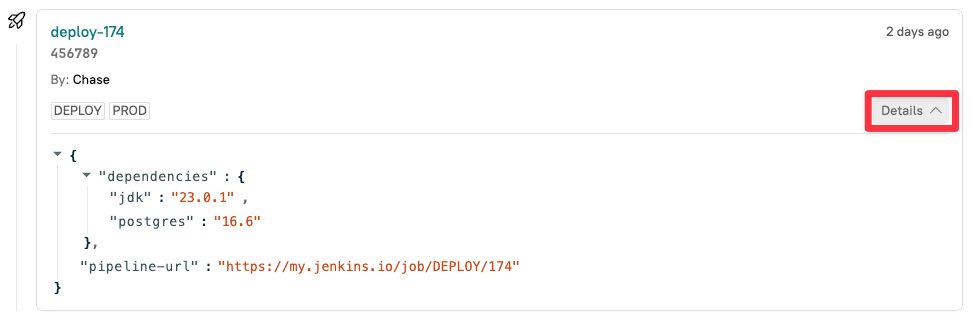
5. Click **Details** next to the relevant deployment entry to expand it and view the custom data.<br>

   <div align="left" data-with-frame="true"><figure><img src="/files/9hmXDOcJXE7KEMek1NNH" alt="The &#x27;Details&#x27; button on the Deploys page of an entity."><figcaption></figcaption></figure></div>

## Viewing deployment data

Deployment data is found in the following areas of Cortex:

* [Entity pages](#viewing-deployments-on-entity-pages)
* [Eng Intelligence](#viewing-deployments-in-eng-intelligence)
* [CQL and Scorecards](#use-deployment-data-in-cql-and-scorecards)

### Viewing deployments on entity pages

While viewing an entity's page, you can see its latest deployment information.

To access an entity's page, expand **Catalogs** from the main sidebar, then click **All entities**. Select the entity you want to view.

Deployment information appears in the following areas:

Near the top of the page:
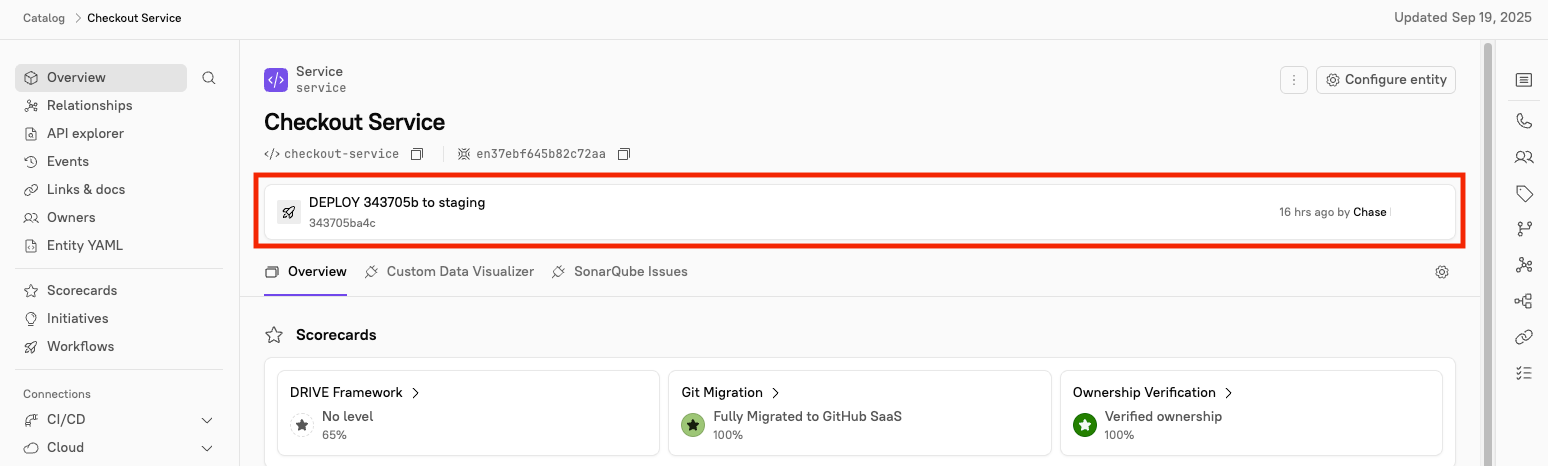
<div align="left" data-with-frame="true"><figure><img src="/files/92m9K1KJDrKLbjpzcHWJ" alt="Deployment information is listed at the top of an entity&#x27;s page." width="375"><figcaption></figcaption></figure></div>

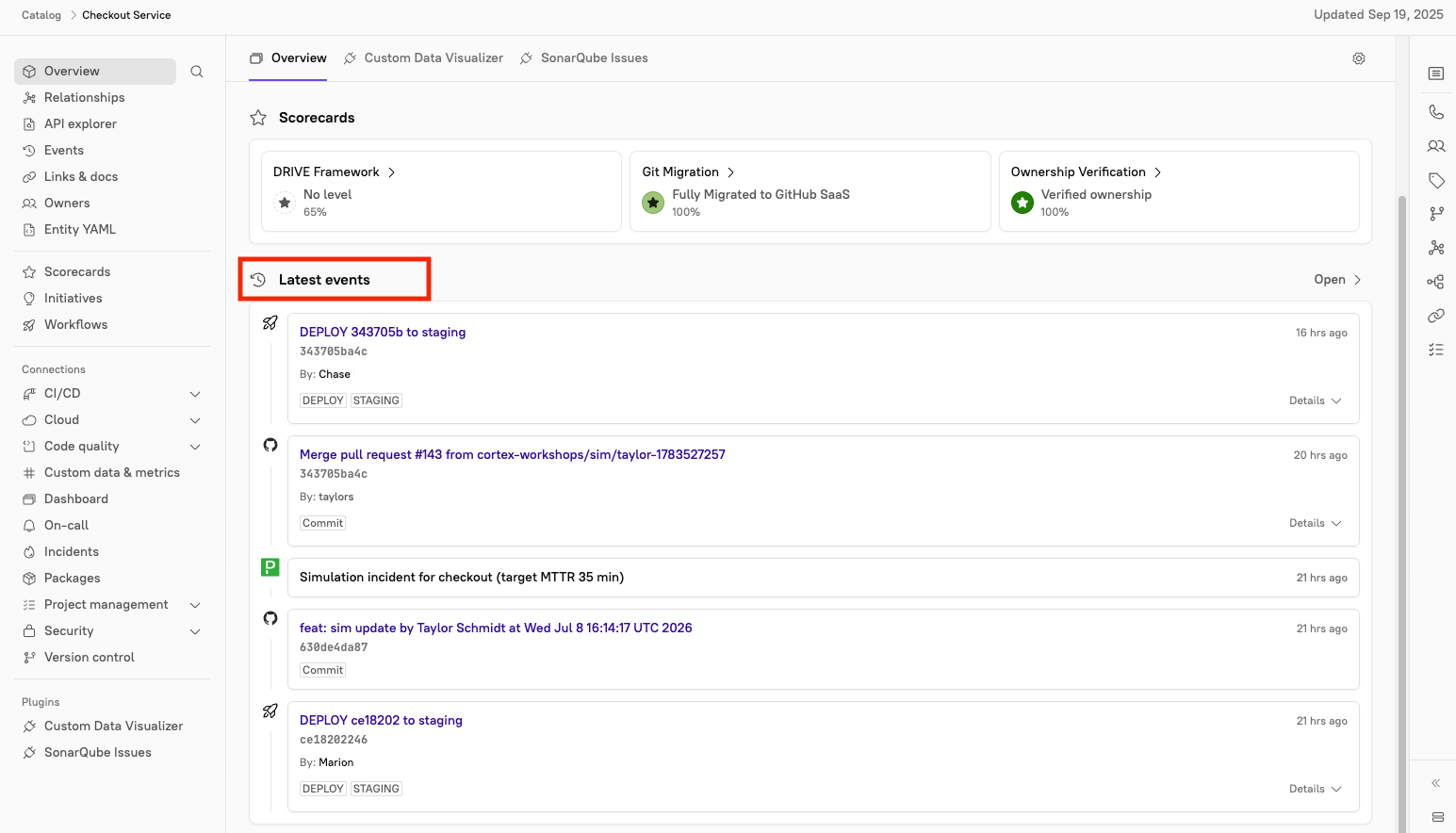
Near the bottom of the page under **Latest events**:

<div align="left" data-with-frame="true"><figure><img src="/files/vzC64el11mIHs4TgkuZp" alt="The &#x27;Latest events&#x27; section of an entity&#x27; page." width="375"><figcaption></figcaption></figure></div>

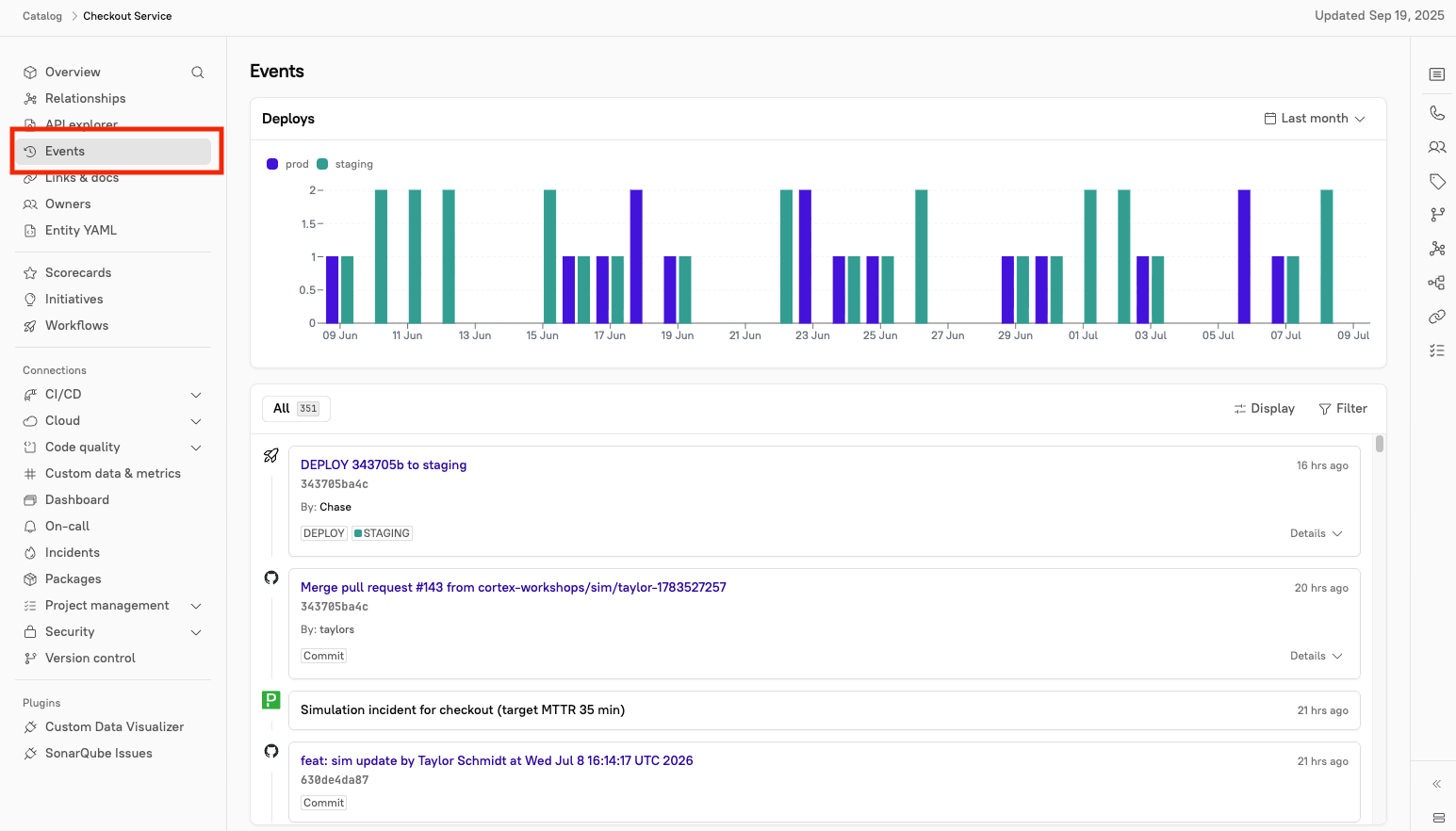
On the **Events** tab:

<div align="left" data-with-frame="true"><figure><img src="/files/AVwSg4R53T3FyYXs5EkF" alt="The &#x27;Events&#x27; tab selected, showing a visual chart of deploys and all recent entity events." width="375"><figcaption></figcaption></figure></div>

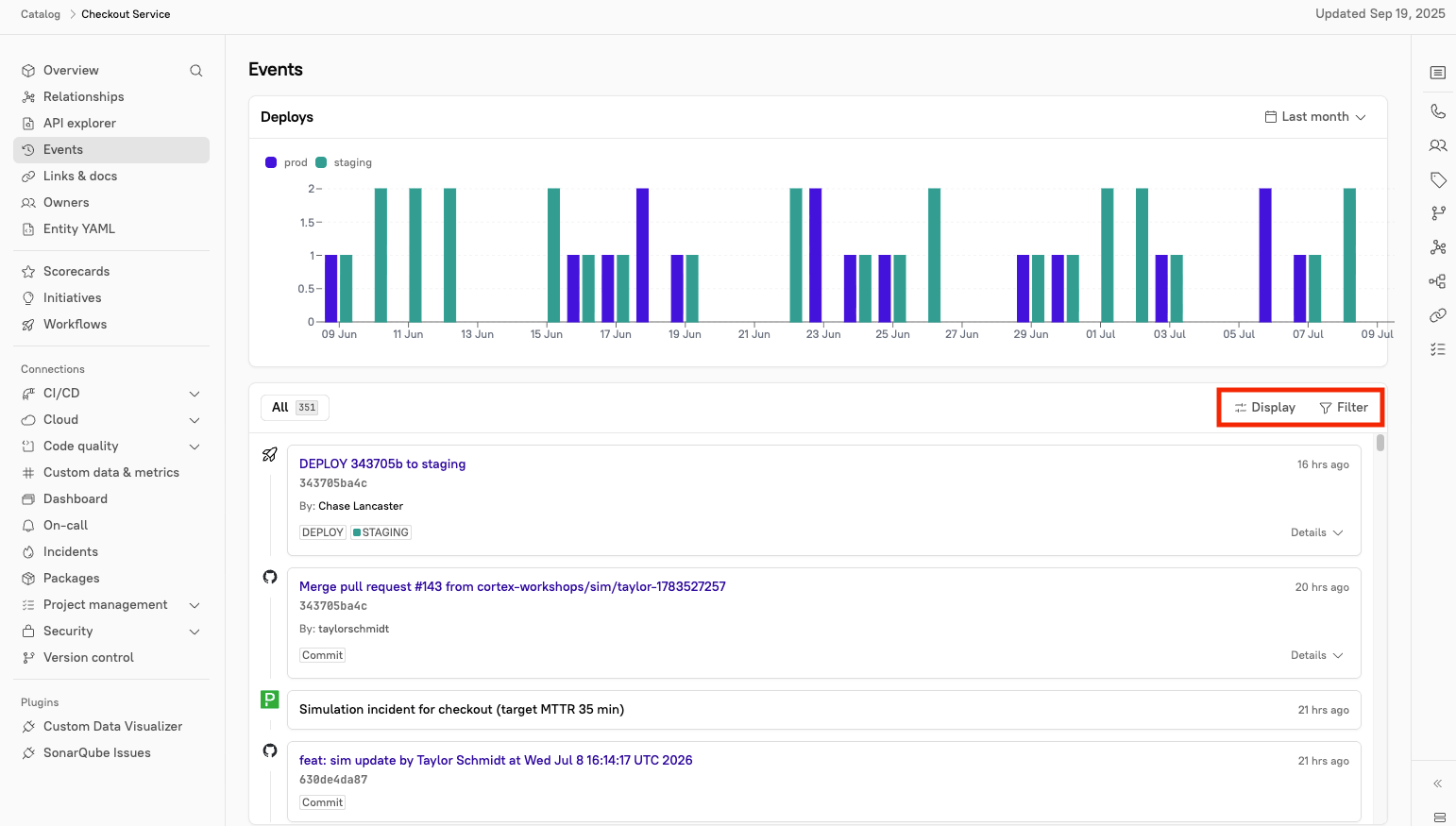
The **Events** page includes:

* A visual chart of deploys
  * By default, the chart shows data from the last month. Click **Last month** in the upper-right to change the timeframe.
* All recent events for the entity
  * Click **Filter** In the upper-right corner of the events list to filter events by type (including **deploys**) and date range.
  * Click **Display** in the upper-right corner of the events list to show dependency events.
<div align="left" data-with-frame="true"><figure><img src="/files/mVGkv83Mk1MNamTxqqRQ" alt="The &#x27;Display&#x27; and &#x27;Filter&#x27; options in the events list." width="375"><figcaption></figcaption></figure></div>

### Viewing deployments in Eng Intelligence

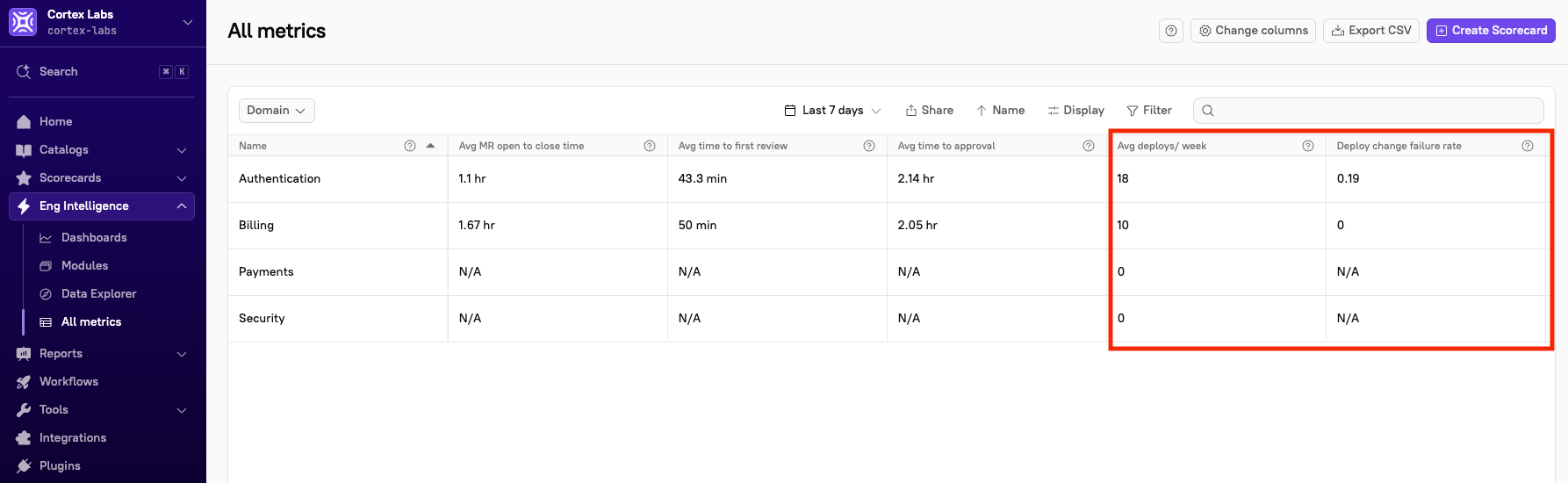
When you add deployment data to Cortex, that data feeds into [Eng Intelligence](/improve/eng-intelligence.md) reporting, giving you visibility into [deploy metrics](/improve/eng-intelligence/eng-intelligence.md#metrics) such as average deploys per week and change failure rate.

**To view deploy metrics in Eng Intelligence**:

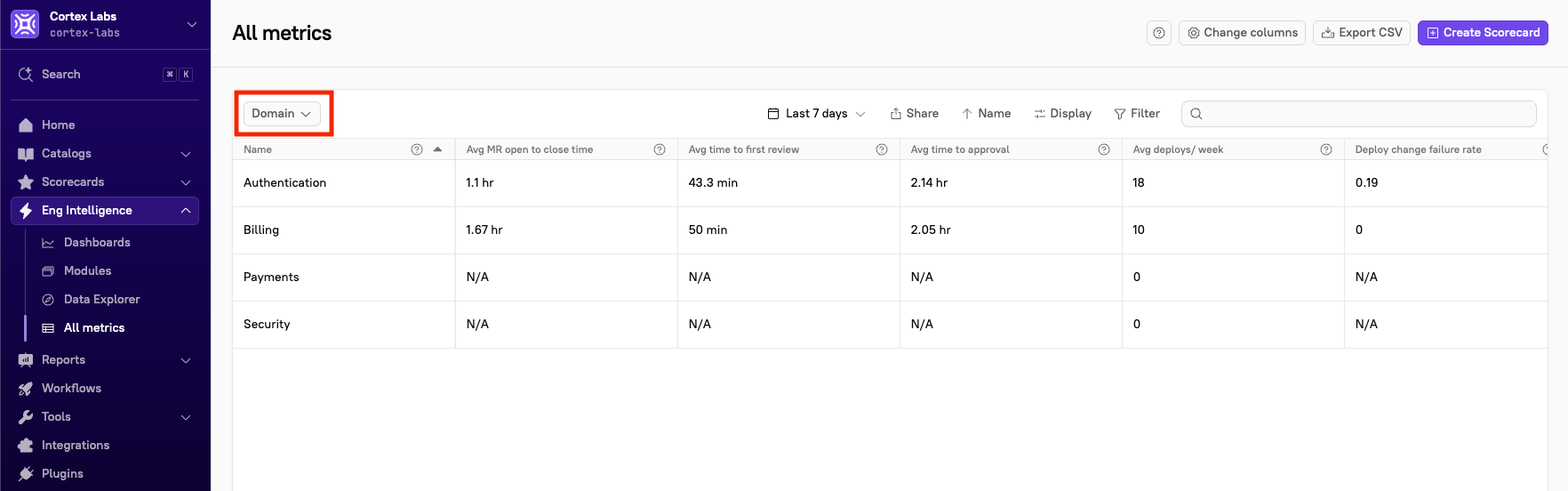
1. From the main sidebar, expand **Eng Intelligence**, then select **All metrics**.&#x20;
2. In the upper-left corner, click the drop-down to change the entity type, e.g. domain.<br>

   <div align="left" data-with-frame="true"><figure><img src="/files/ddD2kKUHYEQObhUjpit4" alt="The drop-down menu, located in the upper-left corner of the page." width="375"><figcaption></figcaption></figure></div>
3. Locate the entity whose deploy metrics you want to view, then click into the **Avg deploys/week** and **Deploy change failure rate** columns to get more information including trends and related activity. <br>
   <div align="left" data-with-frame="true"><figure><img src="/files/fpYzZBQgZRxzyFcRA4NM" alt="The &#x27;Avg deploys/week&#x27; and &#x27;Deploy change failure rate&#x27; columns." width="375"><figcaption></figcaption></figure></div>

For more information, including how to filter the page view, see [All metrics](/improve/eng-intelligence/eng-intelligence.md).

### Using deployment data in CQL and Scorecards

You can use deploy data to write rules for [Scorecards](/standardize/scorecards.md) and to create [CQL reports](/standardize/cql/cql-reports.md).

#### CQL reference

Deploys are added to an entity through the [public API](/api/readme/deploys.md).

**Definition** -  `deploys(lookback: Duration, types: List): List`

**Example**

In a Scorecard, you can write a rule to check whether an entity had fewer than 5 bug fixes in the last month:

```
deploys(lookback = duration("P1M"), types = ["DEPLOY"]).filter((deploy) => deploy.customData != null AND deploy.customData.get("bugFix") == true).length = 2
```

Write a rule to verify that there was, on average, less than 1 rollback for every 4 deploys in the past month:

```
deploys(lookback=duration("P1M"),types=["ROLLBACK"]).length / deploys(lookback=duration("P1M"),types=["DEPLOY", "ROLLBACK", "RESTART"]).length < 0.25
```