

Cortex API
The Cortex REST API provides programmatic access to your entities, Scorecards, Workflows, and more.Base URL
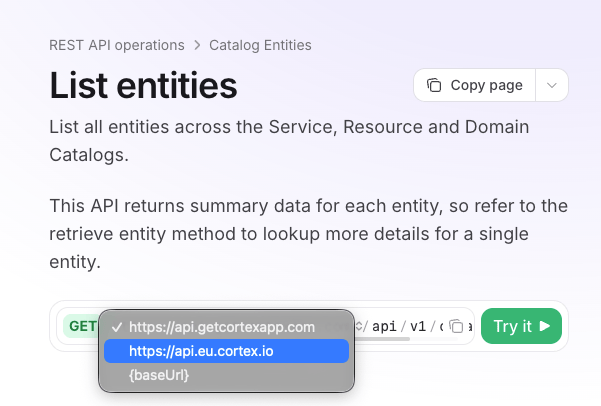
Send API requests to the base URL for the region or deployment where your Cortex workspace is hosted:
If you’re not sure which region your workspace is in, check the URL you use to log in. If it starts with
app.eu.cortex.io, use the EU base URL. If it starts with app.getcortexapp.com, use the US base URL.
For self-managed Cortex, use the hostname you set as app.hostnames.backend in your Helm chart values.
Authentication
All requests to the Cortex API need to provide anAuthorization: Bearer <token> header, where <token> is an API key created in the Settings page of your workspace.
Operations
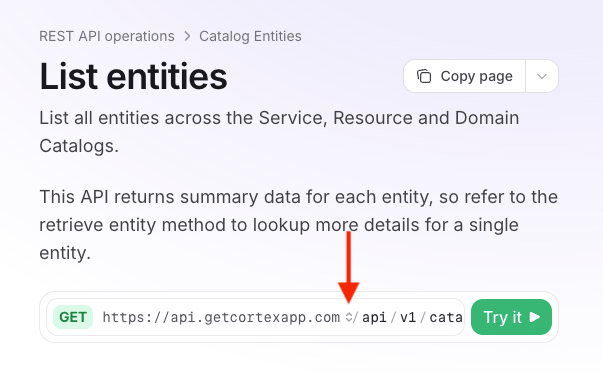
See the sub-pages in this section for all available operations. Throughout these documentation pages, click Try it under an operation to send a request directly from the documentation page. Before you send it, click the base URL next to the endpoint path and select the one that matches your workspace. For self-managed Cortex, select{baseUrl}, then enter your backend URL in the baseUrl field under Server.
Rate limiting
The Cortex API limits requests to 1000 per minute per client. The body size of any given request has a maximum of 2MB. If you attempt too many requests in a short period, a429 error will be returned with a Retry-After header. If you are hitting rate limits frequently, please contact your Cortex Customer Success Manager to discuss your use case.
API rate limits are subject to change. Customers will be notified of any changes made to the rate limits.