

- You can launch a Security Scorecard. Cortex provides a prebuilt Security Scorecard template that you can use to track security-related standards.
- You can launch an Initiative associated with the Scorecard, which gives your engineers a deadline for when to complete certain goals.
- Use reports and Cortex MCP to better understand progress and next steps.
Create a Security Scorecard
Prerequisites
Before using this Scorecard template:- Ensure you have configured integrations for:
Step 1: Create the Scorecard and configure its basic settings
- Cortex UI
- GitOps or API
Create the Scorecard in the Cortex UI
- On the Scorecards page in your workspace, click Create Scorecard.
- On the
Security Scorecardtemplate, click Use. - Configure basic settings, including the Scorecard’s name, unique identifier, description, and more.
- Learn about configuring the basic settings in the Creating a Scorecard documentation.
Step 2: Review and modify rules
Cortex’s templated rules are based on common industry standards:Security: Bronze level rules
Security: Bronze level rules
- Has owners
ownership.allOwners().length > 0 - Code updated in the last week
git.lastCommit().freshness < duration("P7D") - Has Snyk project
snyk != null
Security: Silver level rules
Security: Silver level rules
- SonarQube analysis uploaded within last 7 days
sonarqube.freshness() < duration("P7D") - Default branch is protected
git.branchProtection() != null - At least one required approval to merge
git.numOfRequiredApprovals() > 0 - Code coverage is above 80%
sonarqube.metric("coverage") > 80
Security: Gold level rules
Security: Gold level rules
- Low number of Snyk issues
snyk.issues().length < 5 - Less than 5 SonarQube vulnerabilities
sonarqube.metric("vulnerabilities") < 5 - Less than 5 SonarQube security hotspots
sonarqube.metric("security_hotspots") < 5
Create a Security Initiative
Follow the steps below to create an Initiative:Create a Security Initiative
Create a Security Initiative
To motivate change by a certain deadline, you can create an Initiative:
- While viewing your Security Scorecard, click Create Initiative in the upper right.
- Configure the Initiative fields, including a descriptive name so your team members understand the purpose of the Initiative. For example,
Ensure default branch is protected by end of quarter.- Make sure to enable notifications so users are notified if an entity they own is failing the Initiative’s goal.
- Save the Initiative.
Measuring success
To understand progress of your Scorecard:- Ask Cortex MCP, “How is my Security Scorecard doing?” The MCP will respond with information on the entities that are failing rules and suggested next steps.
-
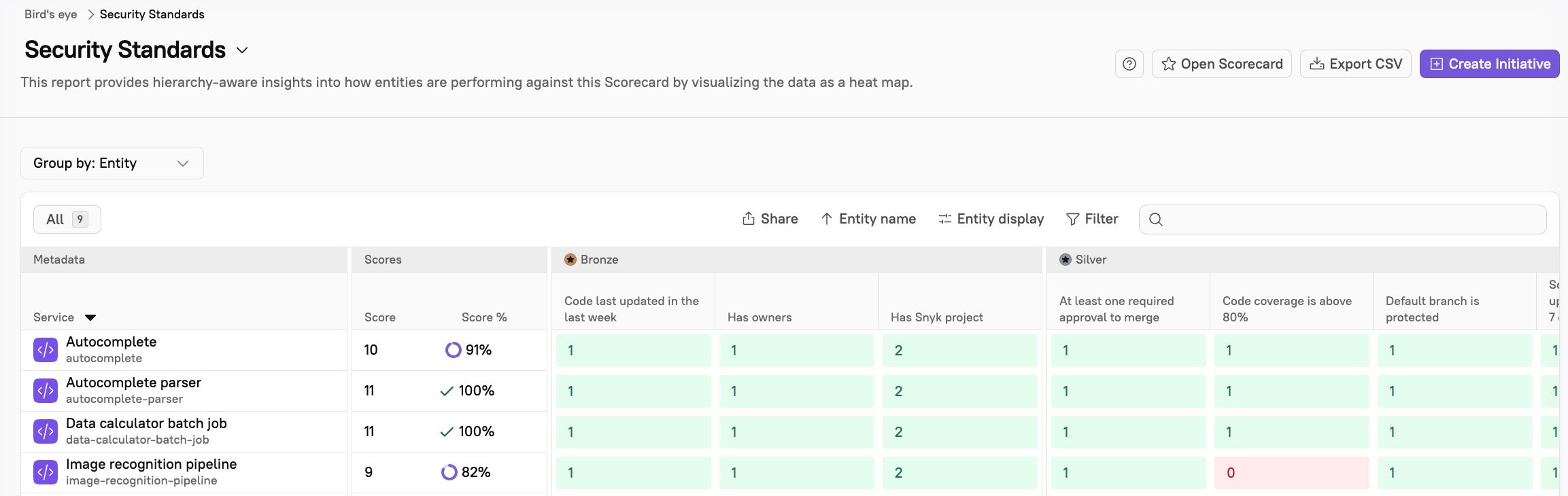
Review reports: The Bird’s Eye report gives insight into how entities are performing against the Scorecard by visualizing the data as a heat map:
- Deployment frequency: With best practices in place, such as requiring branch protection, you may see a reduction in rework and less failed builds.
- Incident frequency: You may see less incidents overall with the implementation of rules such as requiring 80% code coverage and proactively ensuring a low number of vulnerabilities.