

- Launch a Kubernetes Deployment Baseline Scorecard. Cortex provides a prebuilt Kubernetes Scorecard template that you can use to track migration-related controls and standards.
- Launch an Initiative associated with the Scorecard, which gives your engineers a deadline for when to complete certain goals.
- Use reports and Cortex MCP to better understand progress and next steps.
Cortex customer LetsGetCheck cut their Kubernetes migration timeline from 24 months down to 16 months by targeting goals with Initiatives. Read the full case study here.
Create a Kubernetes Scorecard
Prerequisites
Before using this Scorecard template:- Ensure you have configured integrations for:
- Version control: Azure DevOps, Bitbucket, GitHub, or GitLab.
- Kubernetes
Step 1: Create the Scorecard and configure its basic settings
You can create a Scorecard in the Cortex UI, or you can add it to your workspace via GitOps or the Cortex API.- Cortex UI
- GitOps or API
Create Scorecard in the Cortex UI
- On the Scorecards page in your workspace, click Create Scorecard.
- On the
Kubernetes Deployment Baselinetemplate, click Use. - Configure basic settings, including the Scorecard’s name, unique identifier, description, and more.
- Learn about configuring the basic settings in the Creating a Scorecard documentation.
Step 2: Review and modify rules
Cortex’s templated rules are based on common industry standards. See the template in-app for more context on each rule:Level 1: Foundational container hygiene
Level 1: Foundational container hygiene
- Runs in cluster
k8s != null - Dockerignore file exists
git.fileExists(".dockerignore") - Dockerfile exists
git.fileExists("Dockerfile")
Level 2: Runtime ready
Level 2: Runtime ready
- Memory request is set
jq(k8s.spec(), "[.[].template.spec.containers[]] | length") == jq(k8s.spec(), "[.[].template.spec.containers[] | select(.resources.requests.memory != null)] | length") - Memory limit is set
jq(k8s.spec(), "[.[].template.spec.containers[]] | length") == jq(k8s.spec(), "[.[].template.spec.containers[] | select(.resources.limits.memory != null)] | length") - Liveness probe is set
jq(k8s.spec(), "[.[].template.spec.containers[]] | length") == jq(k8s.spec(), "[.[].template.spec.containers[] | select(.livenessProbe != null)] | length") - Readiness probe is set
jq(k8s.spec(), "[.[].template.spec.containers[]] | length") == jq(k8s.spec(), "[.[].template.spec.containers[] | select(.readinessProbe != null)] | length") - CPU request is set
jq(k8s.spec(), "[.[].template.spec.containers[]] | length") == jq(k8s.spec(), "[.[].template.spec.containers[] | select(.resources.requests.cpu != null)] | length")
Level 3: Kubernetes production ready
Level 3: Kubernetes production ready
- Git branch protection
git.branchProtection() != null - No “latest” tag for base image
git.fileContents("Dockerfile").matchesIn("^FROM[ \t]+(?!.*:latest\b).$")
Create a K8s acceleration Initiative
If you notice the team isn’t making progress as quickly as expected, or you need to complete certain rules within a specific timeframe, you can create an Initiative to motivate completion. Follow the steps below to create an Initiative:Create a Kubernetes Initiative
Create a Kubernetes Initiative
- While viewing your Kubernetes Deployment Baseline Scorecard, click Create Initiative in the upper right.
- Configure the Initiative fields, including a descriptive name so your team members understand the purpose of the Initiative. For example,
Accelerate K8s migration.- Make sure to enable notifications so users are notified if an entity they own is failing the Initiative’s goal.
- For the goal, you might want to ask your team to complete a certain level, or specific rules. Examples:
Complete all "Runtime ready" level rules by the end of the quarterorMake sure a Dockerfile exists for every service by end of month.
- Save the Initiative.
Measuring success
To understand progress of your Scorecard:- Ask Cortex MCP, “How is my Kubernetes Deployment Baseline Scorecard doing?” The MCP will respond with information on the entities that are failing rules and suggested next steps.
-
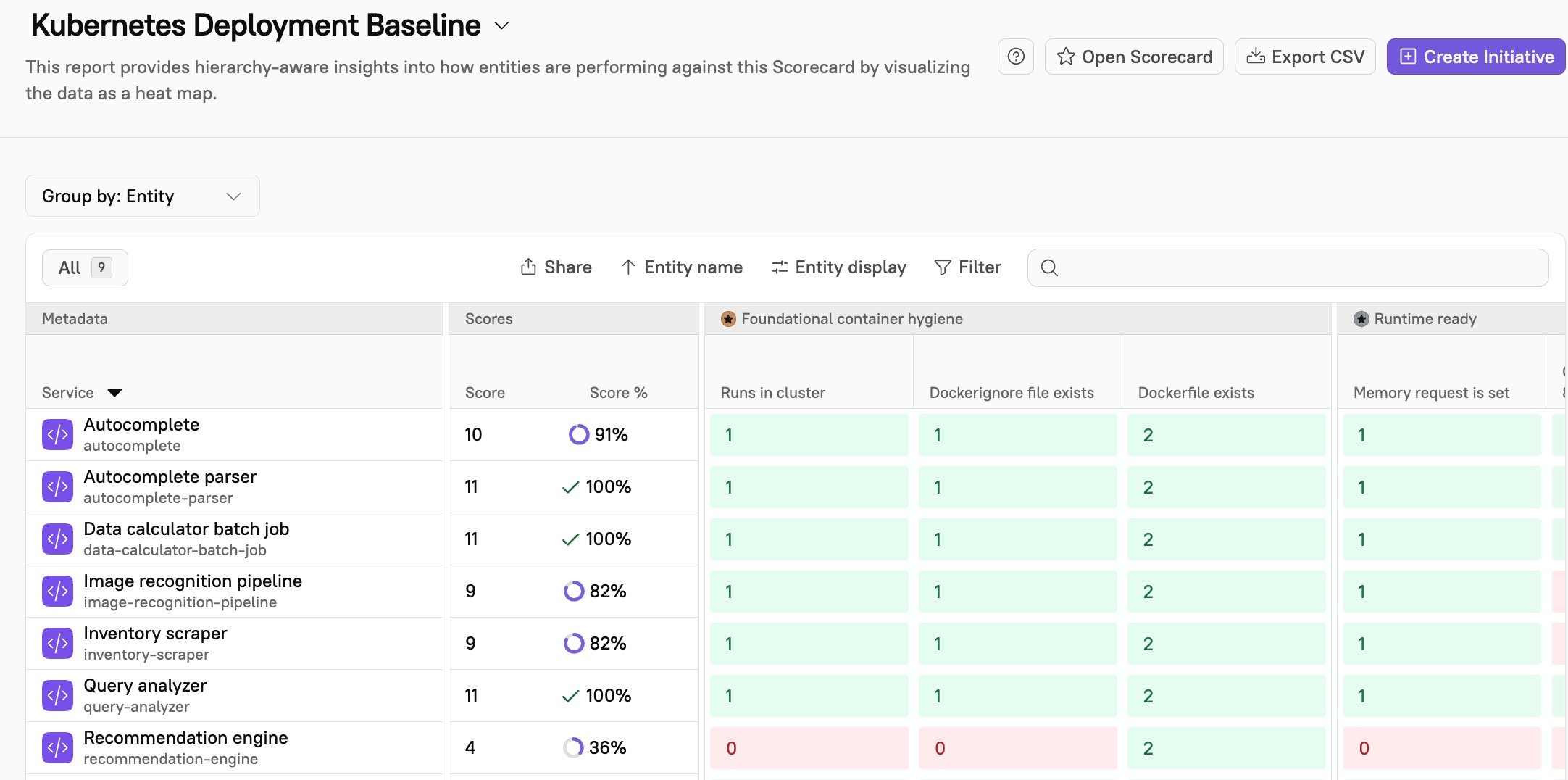
Review reports: The Bird’s Eye report gives insight into how entities are performing against the Scorecard by visualizing the data as a heat map:
- MTTR: Kubernetes best practices, such as liveness probes in place, can result in faster diagnosis and auto-recovery. You may see MTTR decrease.
- Change failure rate: With resource limits reducing pod crashes and no “latest” image tag resulting in deterministic builds, you may see more successful deploys on first attempt, thus decreasing change failure rate.