# Manage an Upcoming EOL for AWS

AWS maintains End of Life calendars for RDS, Lambda and Elasticache. Risks of not upgrading and running an unsupported version include forced upgrades, frozen configurations (no changes possible), and ineligibility for technical support and security patches.&#x20;

You can use a Cortex Scorecard to define and track the progress of your entities migrating to newer versions of RDS, Lambda, and Elasticache. When implemented, the Scorecard in this guide helps you identify services that have or have not yet upgraded.

You can create Scorecards via [API, GitOps](#create-aws-eol-scorecard-via-api-or-gitops), or the [Cortex UI](#create-aws-eol-scorecard-in-the-cortex-ui).

## Create AWS EOL Scorecard via API or GitOps

When following a GitOps approach, you can add a Scorecard YAML file to your `.cortex/scorecards` directory in your version control repository. Note that GitOps must be enabled for Scorecards in your GitOps settings.

You could also use the Cortex API, where you can submit a Scorecard definition in YAML.&#x20;

<details>

<summary>AWS EOL Scorecard YAML</summary>

Use the YAML file below to add this Scorecard to your workspace via the API or via a GitOps flow.

```yaml
description: >-
  
  AWS maintains End of Life calendars for RDS, Lambda and Elasticache.


  Risk of not upgrading and running an unsupported version includes forced upgrade, frozen configuration ( no changes possible) . ineligibility for technical support and security patches.
name: "! EOL Upcoming - AWS"
rules:
  - description: null
    expression:
 (jq(aws.details(), ".resources[0].engine") == "aurora-postgresql" AND jq(aws.details(), ".resources[0].engineVersion | startswith(\"13.\")") == true)
OR
(jq(aws.details(), ".resources[0].engine") == "aurora-mysql" AND jq(aws.details(), ".resources[0].engineVersion | startswith(\"8.\")") == true)
    failureMessage: null
    filter:
      category: RESOURCE
      query: entity_descriptor.info.`x-cortex-type` = "rds"
    level: null
    title: PostgreSQL EOL Version Upgrade Completed
    weight: 10
  - description: null
    expression: (jq(aws.details(), ".resources[0].metadata.engine") == "redis" AND jq(aws.details(), ".resources[0].metadata.engineVersion | split(\".\")[0] | tonumber") >= 7)
OR
(jq(aws.details(), ".resources[0].metadata.engine") == "memcached" AND jq(aws.details(), ".resources[0].metadata.engineVersion | split(\".\")[0] | tonumber") >= 1 AND jq(aws.details(), ".resources[0].metadata.engineVersion | split(\".\")[1] | tonumber") >= 6)
    failureMessage: null
    filter:
      category: RESOURCE
      query: entity_descriptor.info.`x-cortex-type` = "elasticache"
    level: null
    title: Elasticache EOL Version Upgrade Completed
    weight: 10
tag: aws-end-of-life-migration
filter:
  category: RESOURCE
  query: entity_descriptor.info.`x-cortex-type` = "rds" OR
    entity_descriptor.info.`x-cortex-type` = "lambda" OR
    entity_descriptor.info.`x-cortex-type` = "elasticache"
```

</details>

## Create AWS EOL Scorecard in the Cortex UI

### Step 1: Create the Scorecard and configure its basic details

1. In Cortex, navigate to **Scorecards** and click **+Create Scorecard**. Start with a blank Scorecard.
2. Configure the basic details.&#x20;
   * Include a name that helps your users understand the purpose of the Scorecard (e.g., `Upcoming EOL for AWS`) and a description.
   * Learn more about configuring basic fields for Scorecards in [Create a Scorecard](broken://pages/JD5p2dFCbCD5ukbib0Cg#step-1-configure-the-basic-scorecard-fields).
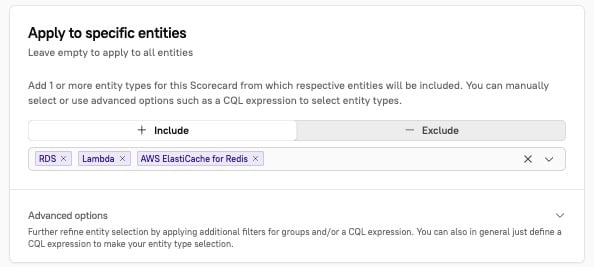
3. Under "Apply to specific entities," narrow the scope of your Scorecard by choosing `RDS`, `Lamba`, and `AWS Elasticache for Redis` entity types.<br>

   <div align="left"><figure><img src="/files/cwOTN4kDk80jggnEt9zt" alt=""><figcaption></figcaption></figure></div>

### Step 2: Add levels and rules

1. Under **Define evaluation rules**, add two levels:
   * EOL Upgrade Required
   * No Pending EOL Upgrade
2. In the "No Pending EOL Upgrade" level, add a rule called `PostgreSQL EOL Version Upgrade Completed`. Include a CQL expression that verifies the entities are not on EOL versions. The following rule passes when Aurora PostgreSQL is 13.x or when Aurora MySQL is 8.x:

```
(jq(aws.details(), ".resources[0].engine") == "aurora-postgresql" AND jq(aws.details(), ".resources[0].engineVersion | startswith(\"13.\")") == true)
OR
(jq(aws.details(), ".resources[0].engine") == "aurora-mysql" AND jq(aws.details(), ".resources[0].engineVersion | startswith(\"8.\")") == true)
```

3. Add another rule called `Elasticache EOL Version Upgrade Completed`. Include a CQL expression that verifies the entities are not on EOL versions. The following rule passes when Redis is 7.x or newer, Memcached is 1.6 or newer, or if no Elasticache exists for the entity:

```
(jq(aws.details(), ".resources[0].metadata.engine") == "redis" AND jq(aws.details(), ".resources[0].metadata.engineVersion | split(\".\")[0] | tonumber") >= 7)
OR
(jq(aws.details(), ".resources[0].metadata.engine") == "memcached" AND jq(aws.details(), ".resources[0].metadata.engineVersion | split(\".\")[0] | tonumber") >= 1 AND jq(aws.details(), ".resources[0].metadata.engineVersion | split(\".\")[1] | tonumber") >= 6)
```

4. At the bottom of the page, click **Save Scorecard**.


---

# Agent Instructions: Querying This Documentation

If you need additional information that is not directly available in this page, you can query the documentation dynamically by asking a question.

Perform an HTTP GET request on the current page URL with the `ask` query parameter:

```
GET https://docs.cortex.io/guides/migrations-and-modernization/manage-an-upcoming-eol-for-aws.md?ask=<question>
```

The question should be specific, self-contained, and written in natural language.
The response will contain a direct answer to the question and relevant excerpts and sources from the documentation.

Use this mechanism when the answer is not explicitly present in the current page, you need clarification or additional context, or you want to retrieve related documentation sections.