

The Report card can be a helpful visual for engineering team retro meetings, as it summarizes wins and opportunities.
Using the Report card
Generate a Report card
Select a Scorecard from the list, then a report is automatically generated based on that Scorecard.Report card metrics
The Report card breaks performance down into several categories:- Top entities shows up to five entities with the highest scores in the selected Scorecard. This section shows each entity’s name, tag, and score.
-
Worst entities shows up to five entities with the lowest scores in the selected Scorecard. This section shows the entity’s name, tag, and score.
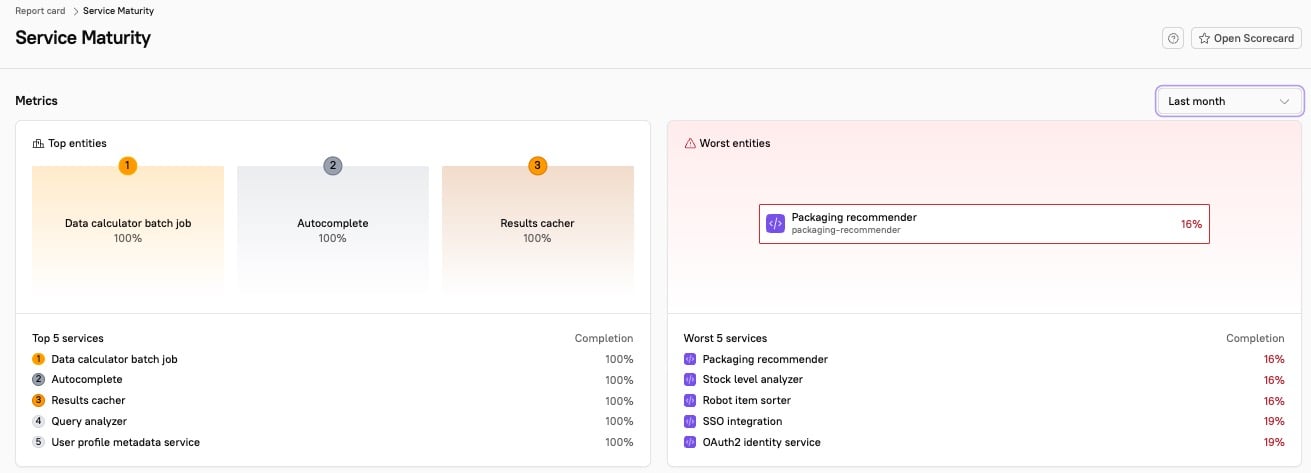
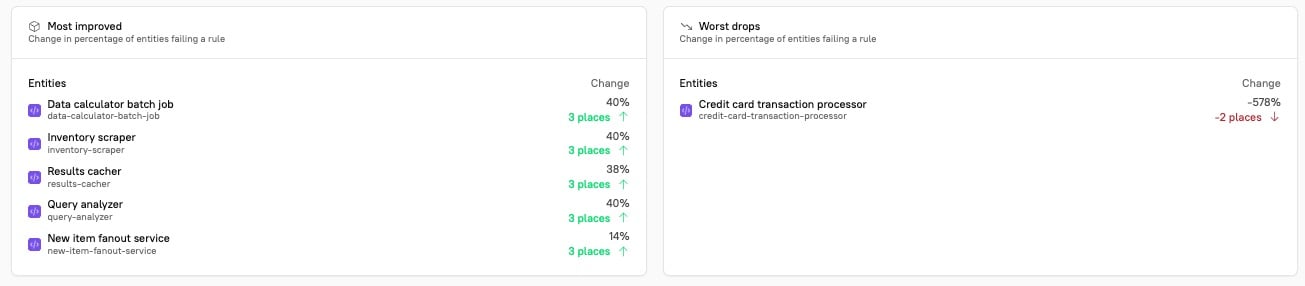
- Most improved shows up to five entities that have improved the most in the selected Scorecard. This section shows each entity’s name, tag, and score. You can also see how many places each entity has moved in rank among all entities.
-
Worst drops shows up to five entities that have dropped the most in score. This section shows each entity’s name, tag, and score. You can also see how many places the entity has moved in rank among all entities in the Scorecard.
- Most moved shows rules with the greatest percentage change in entities failing the specific rule. This section shows the rule definition and the percent change. In this case, a negative change is a good thing — it means fewer entities are failing that rule (in other words, more entities are passing the rule).
-
Rules with highest risk shows the rules with the lowest passing rates. This section shows the rule definition and the percent of entities failing a given rule.

Negative percentages in the Most moved section are a good thing - this means fewer entities are failing a given rule.