

Review, prioritize, and complete tasks
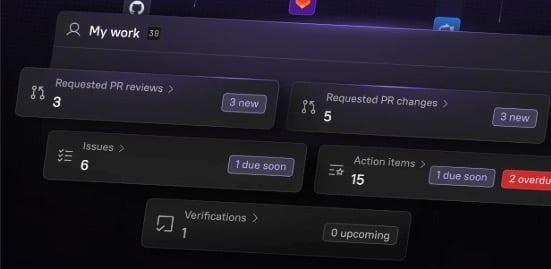
Prioritize and complete work from the homepage
Prioritize and complete work from the homepage

- Active work: See your open PRs, PRs assigned for review, active Jira tickets, and action items from Scorecards and Initiatives, ensuring you act quickly on work that has a direct impact on DORA metrics.
- On-call status: See current and upcoming on-call shifts, helping you stay prepared for efficient incident response.
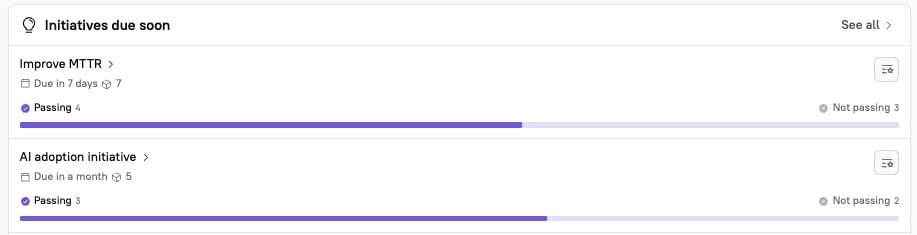
- Scorecards and Initiatives: In the Scorecard section, see real-time progress toward standards. Under “Initiatives due soon,” see action items and their due dates.
- Shortcuts: Use direct links to quickly access your owned entities.
Act on failing Scorecard rules
Act on failing Scorecard rules
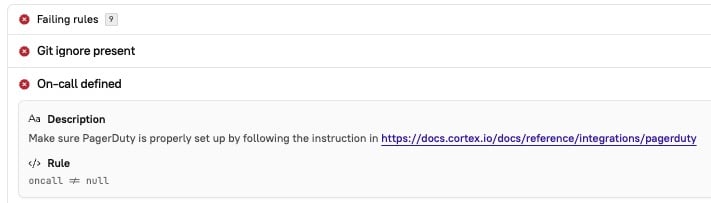
Review failing rules
When a Scorecard rule is failing, this information is surfaced to you in multiple ways:- Scorecard rules that require your attention appear on the Engineering homepage.
- You can receive notifications via Slack, Microsoft Teams, or email when a Scorecard rule is failing.
- Learn more in the Notifications docs.
- You can review a Scorecard’s progress in reports or by viewing the Scorecard in Cortex.
Remediate failing rules
When a service falls short of standards, there are different ways you can approach remediation:- You can identify and troubleshoot trends in Scorecards, and consider scalable remediation efforts. Learn more in Review and evaluate Scorecards.
- You can set up an Initiative to assign and track remediation tasks.
- You can also automatically create issues in Jira, ClickUp, Azure DevOps, and GitHub based on Initiatives. After creating an issue config, Cortex will automatically create a parent issue for each entity with failing rules, and each failing rule will be created as a subtask. Learn more in Creating issues based on Initiatives.
Use Cortex MCP to reduce MTTR
For a faster incident response, use Cortex MCP to gather information about affected entities and get suggested next steps. This more efficient process contributes directly to reducing your MTTR. See an example incident response approach using Cortex MCP in Incident Response in action.Analyze and act on trends in Eng Intelligence metrics
Eng Intelligence allows you to view organization-wide and historical data, making it easy for leaders to validate the impact of Scorecards and for teams to see their progress toward goals.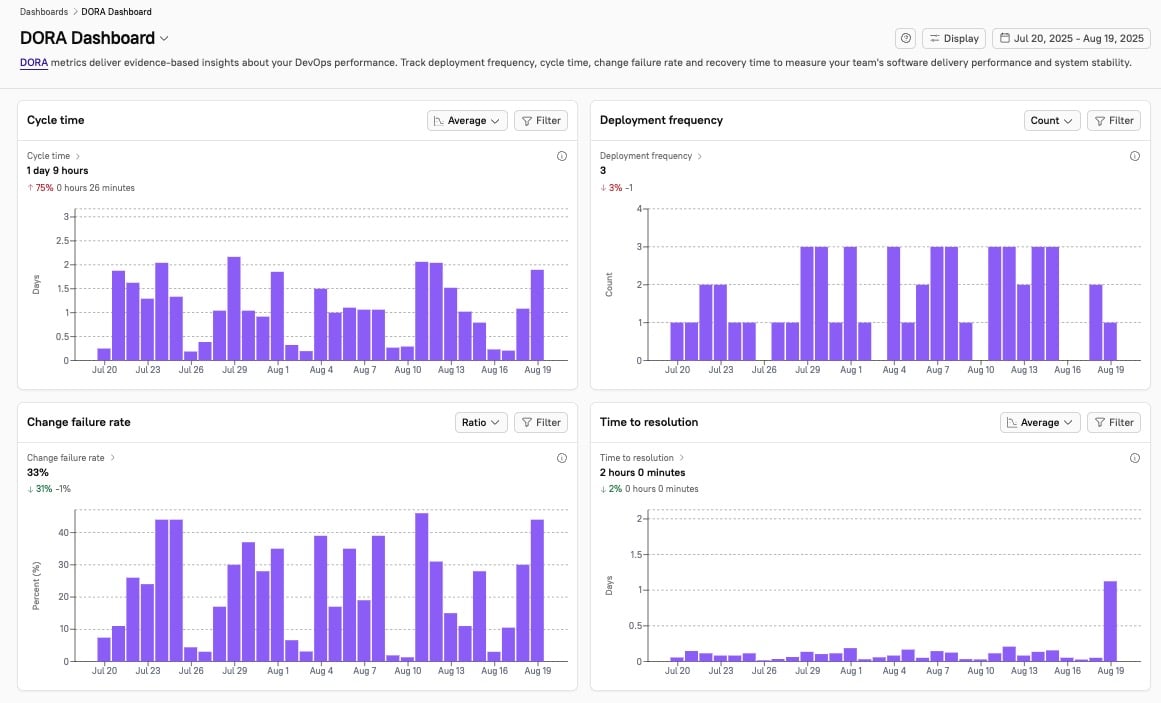
- Measure: Track cycle time, deployment frequency, change failure rate, and time to resolution in the DORA Dashboard.
- Look at these trends before launching Scorecards to better understand your baseline performance.
- Investigate: On the DORA Dashboard, filter the individual metrics by date range, group, owner, repo, and labels to spot trends, and switch aggregations for cycle time and MTTR to spot outliers. Use the Data Explorer to drill into underlying data from deploys, version control systems, Jira, and PagerDuty, and validate where bottlenecks occur.
- Take action: When you identify a bottleneck that affects your DORA benchmarks, take action.
- For example:
- Create a targeted Initiative to fix an issue. For instance, if your rules relating to MTTR are not passing, you might create an Initiative directly from the Scorecard to target MTTR.
- Initiatives send notifications to users asking them to complete tasks by the deadline you configured. Learn more in Initiatives and Action items.
- To promote broader changes, launch a Scorecard.
- To improve efficiency in a process, ask users to start using Cortex MCP.
- For an example demonstrating how you can use Cortex MCP to improve incident response time, see Incident Response in action.
- Create a targeted Initiative to fix an issue. For instance, if your rules relating to MTTR are not passing, you might create an Initiative directly from the Scorecard to target MTTR.
- For example:
- Validate impact: After taking action, watch as metrics like MTTR, cycle time, or deployment frequency shift on your DORA Dashboard while your team works to meet goals.
- For example:
- After you launch a DORA Scorecard, you see deploy frequency increasing as the team adopts the new standards.
- After you require users to configure and use Cortex MCP, you see MTTR decreasing as the team’s incident response process becomes more efficient.
- For example: