Create ServiceNow incident

After integrating Cortex with ServiceNow, you can create Workflows to trigger ServiceNow actions, create tickets, or update records.

This guide describes how to use a Workflow to create a ServiceNow incident.

How to automate ServiceNow incident creation in Cortex

Prerequisites

Before getting started:

  • Create the following secrets in Cortex:

    • A ServiceNow access token named servicenow_token

    • A token for name of your ServiceNow domain named servicenow_domain

  • You must have the Edit Workflows permission to create the Workflow, and the Execute Workflow runs permission to run it.

Step 1: Create the Workflow

You can create a Workflow in the Cortex UI or via the Cortex CLI.

Add the Workflow via CLI

You can use the Cortex CLI to add the example Workflow to your workspace. This allows you to quickly set up the example configuration then iterate on it for your own use case. Expand the tile below to learn more:

Import the Workflow via CLI
  1. Save the Workflow example YAML file below:

name: Create ServiceNow Incident
tag: create-servicenow-incident-2bed57cd-fcf4-40ed-a916-0857f9748ff0
description: "This template allows you to create a ServiceNow incident from Cortex.\
  \ \nThe following fields are included, but you can add more:\n* Short Description\n\
  * Description\n* Severity\n\nThe workflow will use the email from the user running\
  \ the workflow to set the `opened by` field. If the workflow is run from an entity's\
  \ context and it has an `x-cortex-servicenow.service.id`, the incident is associated\
  \ to the CI in ServiceNow. This assumes that the service was imported from the `cmdb_ci_service`\
  \ table in ServiceNow.\n\nThis workflow requires that you set up the following secrets\
  \ in the [Secrets settings page](/admin/settings/secrets):\n* ServiceNow access\
  \ token: (servicenow_token)\n* Name of ServiceNow domain: (servicenow_domain)\n\n\
  Failure to do so will result in errors when running the workflow."
isDraft: true
filter:
  entityFilter:
    typeFilter:
      types:
      - service
    entityGroupFilter: null
  ownershipScope: ALL
  type: ENTITY
runResponseTemplate: null
failedRunResponseTemplate: null
restrictActionCompletionToRunnerUser: false
actions:
- name: Incident details
  slug: incident-details
  schema:
    inputs:
    - name: Short description
      description: null
      key: short-description
      required: true
      defaultValue: null
      placeholder: null
      validationRegex: null
      type: INPUT_FIELD
    - name: Description
      description: null
      key: description
      required: true
      defaultValue: null
      placeholder: null
      validationRegex: null
      type: TEXTAREA_FIELD
    - name: Severity
      description: null
      key: severity
      required: true
      options:
      - "1"
      - "2"
      - "3"
      - "4"
      - "5"
      optionsLabels: null
      defaultValue: null
      placeholder: null
      allowAdditionalOptions: false
      type: SELECT_FIELD
    - name: Urgency
      description: null
      key: urgency
      required: false
      options:
      - 1 - High
      - 2 - Medium
      - 3 - Low
      optionsLabels: null
      defaultValue: null
      placeholder: null
      allowAdditionalOptions: false
      type: SELECT_FIELD
    - name: Impact
      description: null
      key: impact
      required: false
      options:
      - 1 - High
      - 2 - Medium
      - 3 - Low
      optionsLabels: null
      defaultValue: null
      placeholder: null
      allowAdditionalOptions: false
      type: SELECT_FIELD
    inputOverrides: []
    jsValidatorScript: null
    type: USER_INPUT
  outgoingActions:
  - get-user-sys-id
  isRootAction: true
- name: Get User Sys_ID
  slug: get-user-sys-id
  schema:
    headers:
      Authorization: "Basic {{ context.secrets.servicenow_token }}"
    httpMethod: GET
    payload: null
    url: "https://{{context.secrets.servicenow_domain}}.service-now.com/api/now/table/sys_user?sysparm_query=email%3D{{context.initiatedBy.email}}&sysparm_limit=10"
    type: HTTP_REQUEST
  outgoingActions:
  - extract-user-sys-id
  isRootAction: false
- name: Extract User Sys ID
  slug: extract-user-sys-id
  schema:
    expression: ".actions.\"get-user-sys-id\".outputs.body.result[0].sys_id"
    type: JQ
  outgoingActions:
  - get-sysid-of-service
  isRootAction: false
- name: Get SysID of Service
  slug: get-sysid-of-service
  schema:
    expression: .context.entity.descriptor
    type: JQ
  outgoingActions:
  - extract-service-sys-id
  isRootAction: false
- name: Extract Service Sys ID
  slug: extract-service-sys-id
  schema:
    expression: ".actions.\"get-sysid-of-service\".outputs.result.info.\"x-cortex-servicenow\"\
      .services[0].id"
    type: JQ
  outgoingActions:
  - create-incident
  isRootAction: false
- name: Create Incident
  slug: create-incident
  schema:
    headers:
      Content-Type: application/json;charset=UTF-8
      Authorization: "Basic {{ context.secrets.servicenow_token }}"
    httpMethod: POST
    payload: "{\"short_description\":\"{{actions.incident-details.outputs.short-description}}\"\
      ,\"description\":\"{{actions.incident-details.outputs.description}}\",\"opened_by\"\
      :\"{{actions.extract-user-sys-id.outputs.result}}\",\"severity\":\"{{actions.incident-details.outputs.severity}}\"\
      ,\"business_service\":\"{{actions.extract-service-sys-id.outputs.result}}\"\
      , \"urgency\":\"{{actions.incident-details.outputs.urgency}}\", \"impact\":\"\
      {{actions.incident-details.outputs.impact}}\"}"
    url: "https://{{context.secrets.servicenow_domain}}.service-now.com/api/now/table/incident"
    type: HTTP_REQUEST
  outgoingActions: []
  isRootAction: false
runRestrictionPolicies: []
iconTag: null
variables: []
  1. Use the Cortex CLI to run this command, using the path to your Workflow YAML file: cortex workflows create -f <path-to-your-workflow.yaml>

Step 2: Run the Workflow

  • In the list of Workflows, locate the "Create ServiceNow incident" Workflow and click Run.

When you run the Workflow, the following events happen:

  1. The Workflow pauses to collect a response from the user during the User Input block. The user enters a short description, description, severity, urgency, and impact.

  2. The HTTP Request block runs, which obtains the ServiceNow Sys_ID of the user who initiated the Workflow in Cortex.

  3. The Data transformation blocks run, transforming the data to get the Sys_ID of the service and its entity descriptor from Cortex.

  4. In the final HTTP Request block, it sends a payload to the ServiceNow API including the information entered by the user during the first step, and the data that was pulled from the SysID and entity descriptor. An incident is opened in ServiceNow.

Install Cortex's ServiceNow Incidents plugin

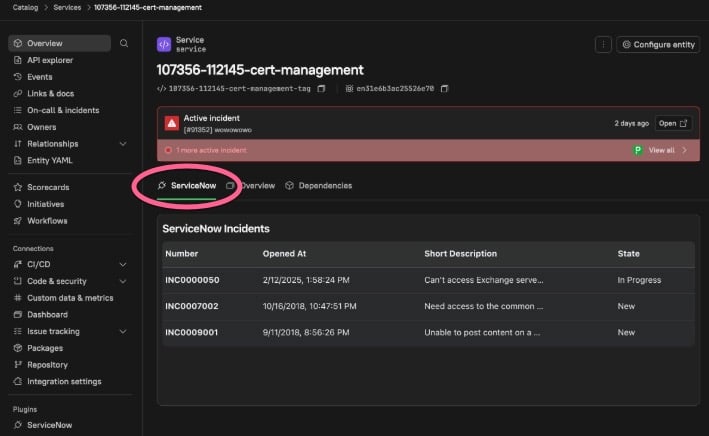
To further highlight visibility of ServiceNow incidents in Cortex, you can also install the ServiceNow Incidents plugin.

After installing, you can view incidents within a ServiceNow tab directly on an entity's details page:

ServiceNow incidents are displayed under a tab on an entity details page.

Last updated

Was this helpful?