

DORA Metrics Scorecard example
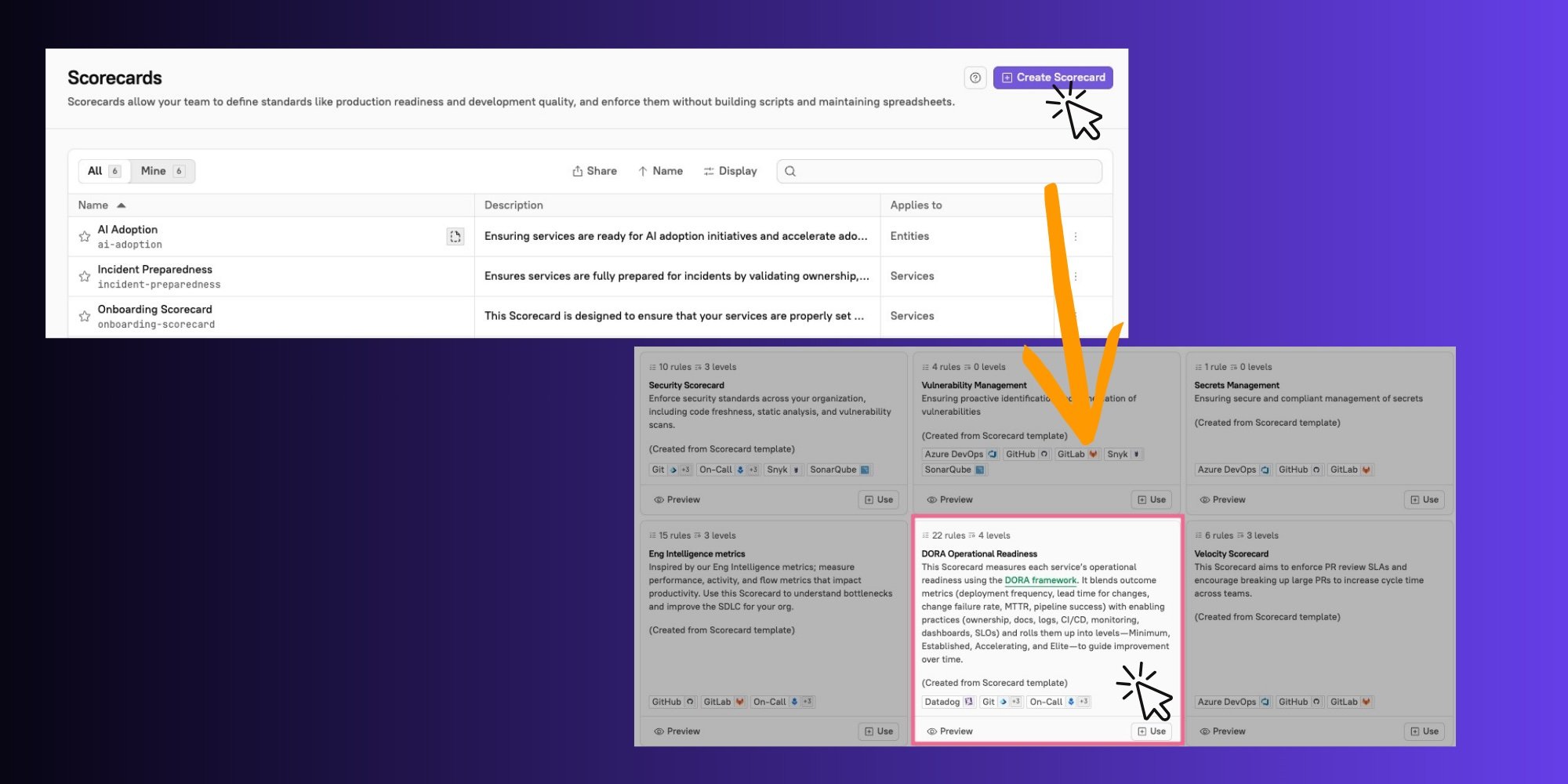
In this example, assume that you have launched a DORA Metrics Scorecard based on the out-of-the-box template provided in Cortex.To launch this Scorecard
To launch this Scorecard
- Click Scorecards from the main nav in Cortex.
- In the upper right corner, click Create Scorecard. In the
DORA Operational Readinesstemplate tile, click Use.
DORA performance levels
Cortex’s DORA Scorecard template is based on the established DORA standards of performance.Scorecard rules
The Scorecard contains four levels: Minimum, Established, Accelerating, and Elite. Each level corresponds with increasingly higher performance against DORA standards.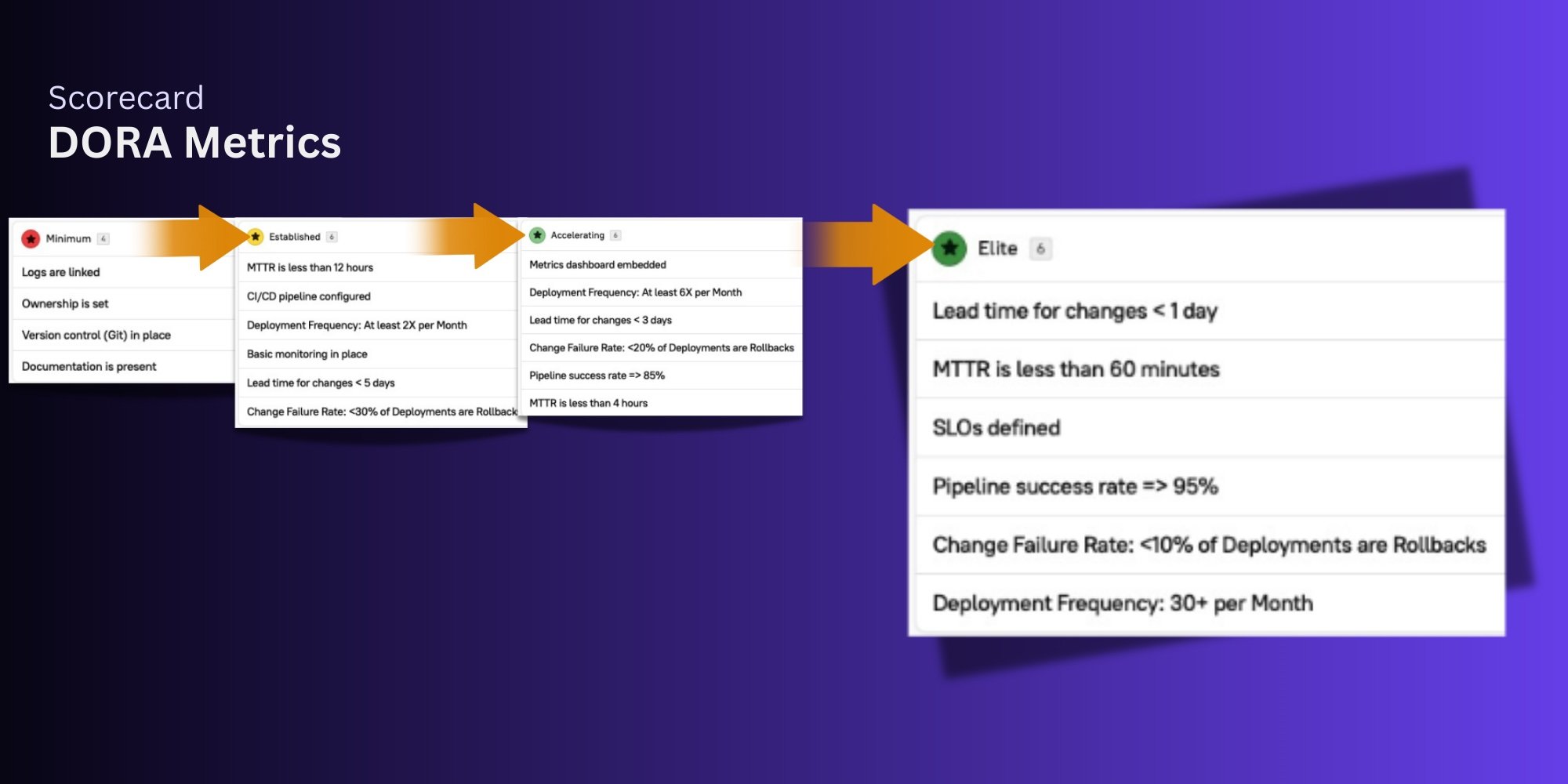
DORA Scorecard rules
DORA Scorecard rules
The progress your team makes against these rules allows you to assess the agility, stability, and quality of your software delivery process.
Minimum
These rules help you establish a baseline of readiness to start measuring DORA metrics.- Logs are linked
- Ownership is set
- Version control (Git) is in place
- Documentation is present
Established
These rules motivate your teams to achieve DORA’s Medium-level benchmarks for key metrics.- MTTR is less than 12 hours
- Deployment frequency is at least 2x/month
- Lead time for changes less than 5 days
- Change failure rate: <30% of deployments are rollbacks
- Basic monitoring in place
- CI/CD pipeline configured
Accelerating
These rules motivate your teams to achieve DORA’s High-level benchmarks for key metrics.- MTTR less than 4 hours
- Deployment frequency is at least 6x/month
- Lead time for changes less than 3 days
- Change failure rate: <20% of deployments are rollbacks
- Metrics dashboard embedded
- Pipeline success rate => 85%
Elite
These rules motivate your teams to achieve DORA’s Elite-level benchmarks for key metrics.- MTTR less than 1 hour
- Deployment frequency is 30+ per month
- Lead time for changes is less than 1 day
- Change failure rate: <10% of deployments are rollbacks
- SLOs are defined
- Pipeline success rate => 95%
Understanding Scorecard levels
Assume the following for an entity:- It’s passing 3/4 rules in the Minimum level
- It has logs linked, ownership set, and a version control integration configured (passing)
- It does not have documentation linked (failing)
- It’s passing all rules in the Established level
- It is failing the rule “Documentation is present” in the Minimum level. Because of this, it has not fully achieved the Minimum level, the first one that an entity can pass.
- Once the entity has documentation linked, it will achieve all rules in the Minimum level. Because it is already passing all rules required for the Established level, this means it will automatically achieve the Established level.
This kind of gamification motivates developers to not only progress through the levels, but to maintain the quality of their entities over time.
Driving continuous improvement against DORA benchmarks
Measuring your performance against DORA standards does not start and stop with launching a Scorecard. We recommend taking the steps described below to understand your baseline, motivate change, and continuously improve:1
Measure baseline metrics
Measure your metrics in the DORA Dashboard.
2
Investigate
Drill down into underlying data in Data Explorer.
3
Take action
Codify expectations by launching a Scorecard, allowing you to continuously evaluate entities against standards using live data from integrated tools.
4
Validate impact
Review your DORA Dashboard to see improved metrics, validating the impact of the DORA Metrics Scorecard.