# Enforce security standards
Launching a Security Scorecard in Cortex allows you to automatically evaluate all services against defined security standards, such as. ownership, code coverage, and vulnerability scans. This ensures gaps are identified proactively rather than being discovered during incidents or audits.
To enforce security standards and promote continuous improvement:
* You can launch a Security Scorecard. Cortex provides a prebuilt Security [Scorecard](https://app.gitbook.com/s/JW7pYRxS4dHS3Hv6wxve/standardize/scorecards) template that you can use to track security-related standards.
* You can [launch an Initiative](#create-a-soc-2-initiative) associated with the Scorecard, which gives your engineers a deadline for when to complete certain goals.
* [Use reports and Cortex MCP](#measuring-success) to better understand progress and next steps.
## Create a Security Scorecard
### Prerequisites
Before using this Scorecard template:
* Ensure you have configured integrations for:
* Version control: [Azure DevOps](https://app.gitbook.com/s/JW7pYRxS4dHS3Hv6wxve/ingesting-data-into-cortex/integrations/azuredevops), [Bitbucket](https://app.gitbook.com/s/JW7pYRxS4dHS3Hv6wxve/ingesting-data-into-cortex/integrations/bitbucket), [GitHub](https://app.gitbook.com/s/JW7pYRxS4dHS3Hv6wxve/ingesting-data-into-cortex/integrations/github), or [GitLab](https://app.gitbook.com/s/JW7pYRxS4dHS3Hv6wxve/ingesting-data-into-cortex/integrations/gitlab).
* [Snyk](https://app.gitbook.com/s/JW7pYRxS4dHS3Hv6wxve/ingesting-data-into-cortex/integrations/snyk)
* This Scorecard uses Snyk for its vulnerability rules, but the rules can be modified to check vulnerability data from [Checkmarx](https://app.gitbook.com/s/JW7pYRxS4dHS3Hv6wxve/ingesting-data-into-cortex/integrations/checkmarx), [Mend](https://app.gitbook.com/s/JW7pYRxS4dHS3Hv6wxve/ingesting-data-into-cortex/integrations/mend), [Semgrep](https://app.gitbook.com/s/JW7pYRxS4dHS3Hv6wxve/ingesting-data-into-cortex/integrations/semgrep), [Veracode](https://app.gitbook.com/s/JW7pYRxS4dHS3Hv6wxve/ingesting-data-into-cortex/integrations/veracode), or [Wiz](https://app.gitbook.com/s/JW7pYRxS4dHS3Hv6wxve/ingesting-data-into-cortex/integrations/wiz).
* See [CQL Explorer](https://app.getcortexapp.com/admin/queries) in your Cortex workspace for example queries for these integrations.
* [SonarQube](https://app.gitbook.com/s/JW7pYRxS4dHS3Hv6wxve/ingesting-data-into-cortex/integrations/sonarqube)
* This Scorecard uses SonarQube for its code coverage rule, but the rule can be modified to check code coverage data from [Codecov](https://app.gitbook.com/s/JW7pYRxS4dHS3Hv6wxve/ingesting-data-into-cortex/integrations/codecov).
### Step 1: Create the Scorecard and configure its basic settings
{% tabs %}
{% tab title="Cortex UI" %}
#### Create the Scorecard in the Cortex UI
1. On the [**Scorecards** page](https://app.getcortexapp.com/admin/scorecards) in your workspace, click **Create Scorecard**.
2. On the `Security Scorecard` template, click **Use**.
3. Configure basic settings, including the Scorecard's name, unique identifier, description, and more.
* Learn about configuring the basic settings in the [Creating a Scorecard documentation](https://app.gitbook.com/o/RD51qiGImxmmq8NjALb1/s/JW7pYRxS4dHS3Hv6wxve/standardize/scorecards/create).
{% endtab %}
{% tab title="GitOps or API" %}
When following a [GitOps approach](https://app.gitbook.com/s/JW7pYRxS4dHS3Hv6wxve/configure/gitops), you can add a Scorecard YAML file to your `.cortex/scorecards` directory in your version control repository. Note that GitOps must be enabled for Scorecards in your GitOps settings.
You could also use the [Cortex API](https://app.gitbook.com/s/nPgS8L9MAPtoOtdWdeDp/readme/scorecards), where you can submit a Scorecard definition in YAML.
Use the YAML file below to add this Scorecard to your workspace via the API or via a GitOps flow.
Security Scorecard YAML
```yaml
tag: security-scorecard
name: Security Scorecard
description: |-
Enforce security standards across your organization, including code freshness, static analysis, and vulnerability scans.
(Created from Scorecard template)
draft: false
notifications:
enabled: true
scoreDropNotificationsEnabled: false
exemptions:
enabled: true
autoApprove: false
userSpecificNotifications: false
ladder:
name: Default Ladder
levels:
- name: Bronze
rank: 1
color: "#c38b5f"
- name: Silver
rank: 2
color: "#8c9298"
- name: Gold
rank: 3
color: "#cda400"
rules:
- title: SonarQube analysis uploaded within the last 7 days
expression: sonarqube.freshness() < duration("P7D")
identifier: 0abbfeac-eda7-3a60-a8a3-eaf4d8fb99f5
weight: 1
level: Silver
failureMessage: "Make sure SonarQube is properly set up by following the instruction\
\ in [our docs](https://docs.cortex.io/docs/reference/integrations/sonarqube)."
- title: Default branch is protected
expression: git.branchProtection() != null
identifier: 21c30af3-6dd6-3bce-bbe5-56e43549015f
weight: 1
level: Silver
failureMessage: "This rule is only supported for GitLab and GitHub. If you don't\
\ have a repository specified, you can add one by following the instructions in\
\ our docs for [GitHub](https://docs.cortex.io/ingesting-data-into-cortex/integrations/github)\
\ or [GitLab](https://docs.cortex.io/ingesting-data-into-cortex/integrations/gitlab),\
\ depending on the tool that your team uses."
- title: Has owners
expression: ownership.allOwners().length > 0
identifier: 92ab2234-ffb1-371b-9488-8ebe3485e503
weight: 1
level: Bronze
failureMessage: "Add an owner by following the instructions in [our docs](https://docs.cortex.io/docs/reference/basics/entities/ownership)."
- title: At least one required approval to merge
expression: git.numOfRequiredApprovals() > 0
identifier: a148260a-81c3-3201-9692-de99fd08ed16
weight: 1
level: Silver
failureMessage: "This rule is only supported for GitLab and GitHub. If you don't\
\ have a repository specified, you can add one by following the instructions in\
\ our docs for [GitHub](https://docs.cortex.io/ingesting-data-into-cortex/integrations/github)\
\ or [GitLab](https://docs.cortex.io/ingesting-data-into-cortex/integrations/gitlab),\
\ depending on the tool that your team uses."
- title: Has a low number of Snyk issues
expression: snyk.issues().length < 5
identifier: afb081c6-b875-32af-a5fb-6be8073cd6b4
weight: 1
level: Gold
failureMessage: "Make sure Snyk is properly set up by following the instructions\
\ in [our docs](https://docs.cortex.io/docs/reference/integrations/snyk)."
- title: Less than 5 SonarQube vulnerabilities
expression: sonarqube.metric("vulnerabilities") < 5
identifier: b4e82b64-65b6-3d91-af4f-2fca115e17ad
weight: 1
level: Gold
failureMessage: "Make sure SonarQube is properly set up by following the instruction\
\ in [our docs](https://docs.cortex.io/docs/reference/integrations/sonarqube)."
- title: Code coverage is above 80%
expression: sonarqube.metric("coverage") > 80
identifier: c286f089-c344-3467-a2e2-cec9ab53871f
weight: 1
level: Silver
failureMessage: "Make sure SonarQube is properly set up by following the instruction\
\ in [our docs](https://docs.cortex.io/docs/reference/integrations/sonarqube)."
- title: Less than 5 SonarQube security hotspots
expression: sonarqube.metric("security_hotspots") < 5
identifier: d93bbdb9-5a4b-387f-9722-a6bd2f42d2a9
weight: 1
level: Gold
failureMessage: "Make sure SonarQube is properly set up by following the instruction\
\ in [our docs](https://docs.cortex.io/docs/reference/integrations/sonarqube)."
- title: Code last updated in the last week
expression: git.lastCommit().freshness < duration("P7D")
identifier: e76714ba-1a0e-31f9-ba34-930146da413f
weight: 1
level: Bronze
failureMessage: "You can add a git repository by following the instructions in our\
\ docs for [version control integrations](https://docs.cortex.io/ingesting-data-into-cortex/integrations#version-control),\
\ depending on the tool that your team uses."
- title: Has Snyk project
expression: snyk != null
identifier: eef8b87a-6326-3418-bab7-2608059aafd4
weight: 2
level: Bronze
failureMessage: "You can add a Snyk project by following the instructions in [our\
\ docs](https://docs.cortex.io/docs/reference/integrations/snyk)."
filter:
kind: GENERIC
types:
include:
- service
```
{% endtab %}
{% endtabs %}
### Step 2: Review and modify rules
Cortex's templated rules are based on common industry standards:
Security: Bronze level rules
* Has owners\
`ownership.allOwners().length > 0`
* Code updated in the last week\
`git.lastCommit().freshness < duration("P7D")`
* Has Snyk project\
`snyk != null`
Security: Silver level rules
* SonarQube analysis uploaded within last 7 days\
`sonarqube.freshness() < duration("P7D")`
* Default branch is protected\
`git.branchProtection() != null`
* At least one required approval to merge\
`git.numOfRequiredApprovals() > 0`
* Code coverage is above 80%\
`sonarqube.metric("coverage") > 80`
Security: Gold level rules
* Low number of Snyk issues\
`snyk.issues().length < 5`
* Less than 5 SonarQube vulnerabilities\
`sonarqube.metric("vulnerabilities") < 5`
* Less than 5 SonarQube security hotspots\
`sonarqube.metric("security_hotspots") < 5`
You can reorder, delete, and edit rules, add more rules to a level, and assign more points to a rule to signify its importance. Behind each rule is a [Cortex Query Language (CQL) ](https://app.gitbook.com/s/JW7pYRxS4dHS3Hv6wxve/standardize/cql)query; you can edit the existing CQL or write your own queries to further refine your rules.
## Create a Security Initiative
Follow the steps below to create an Initiative:
Create a Security Initiative
To motivate change by a certain deadline, you can create an Initiative:
1. While viewing your Security Scorecard, click **Create Initiative** in the upper right.
2. Configure the Initiative fields, including a descriptive name so your team members understand the purpose of the Initiative. For example, `Ensure default branch is protected by end of quarter`.
* Make sure to enable notifications so users are notified if an entity they own is failing the Initiative's goal.
3. Save the Initiative.
After the Initiative is published, entity owners will be notified if their entity is not meeting the goal.
Learn more about [creating Initiatives in the docs](https://app.gitbook.com/s/JW7pYRxS4dHS3Hv6wxve/improve/initiatives).
## Measuring success
To understand progress of your Scorecard:
* Ask [Cortex MCP,](https://app.gitbook.com/s/JW7pYRxS4dHS3Hv6wxve/get-started/mcp) "How is my Security Scorecard doing?" The MCP will respond with information on the entities that are failing rules and suggested next steps.
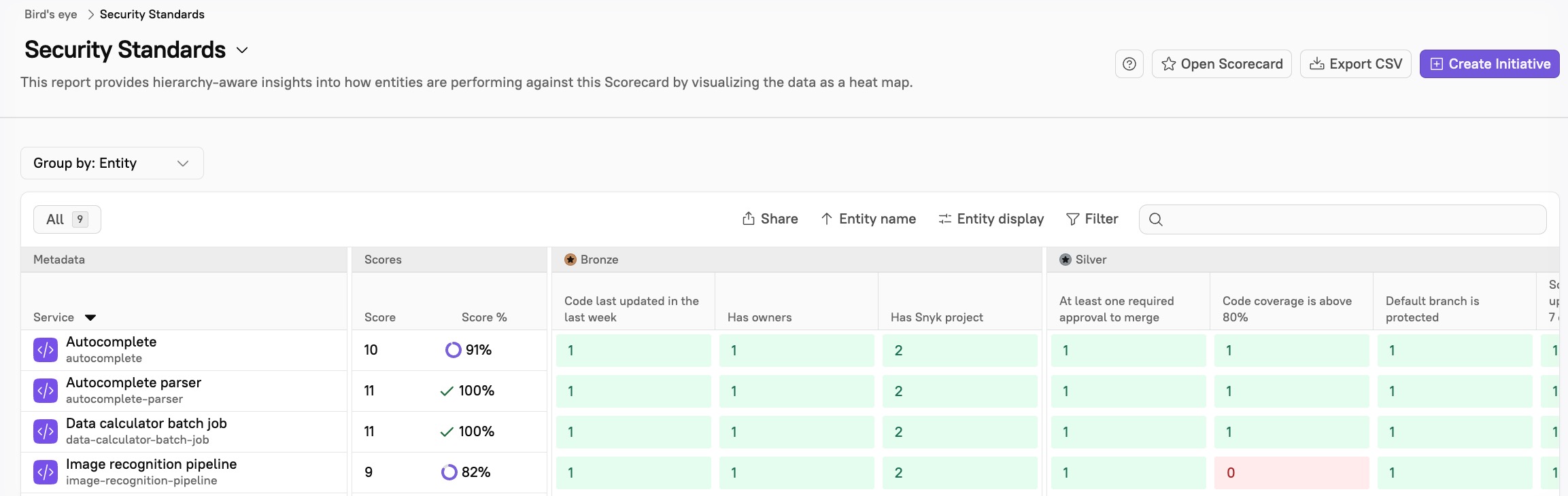
* Review reports: The [Bird's Eye report](https://app.gitbook.com/s/JW7pYRxS4dHS3Hv6wxve/improve/reports/birds-eye) gives insight into how entities are performing against the Scorecard by visualizing the data as a heat map:
You can also review your Engineering Intelligence metrics for impact on key engineering metrics, such as:
* **Deployment frequency**: With best practices in place, such as requiring branch protection, you may see a reduction in rework and less failed builds.
* **Incident frequency**: You may see less incidents overall with the implementation of rules such as requiring 80% code coverage and proactively ensuring a low number of vulnerabilities.