> ## Documentation Index
> Fetch the complete documentation index at: https://docs.cortex.io/llms.txt
> Use this file to discover all available pages before exploring further.

# Surface code coverage metrics from SonarQube in failed Scorecard rules

export const RecipeBadges = ({badges = []}) => {
  const map = {
    "recipe": {
      label: "Recipe",
      color: "#A86400"
    },
    "ai-excellence": {
      label: "AI excellence",
      color: "#653EE8"
    },
    "production-readiness": {
      label: "Production readiness",
      color: "#226686"
    },
    "incident-mgmt": {
      label: "Incident management",
      color: "#86198F"
    },
    "migrations": {
      label: "Migrations",
      color: "#0E7C66"
    },
    "compliance": {
      label: "Compliance",
      color: "#475569"
    },
    "dora": {
      label: "DORA metrics",
      color: "#1D4ED8"
    },
    "security": {
      label: "Security",
      color: "#B42318"
    },
    "operational-readiness": {
      label: "Operational readiness",
      color: "#B54708"
    },
    "dev-onboarding": {
      label: "Developer onboarding",
      color: "#C11574"
    }
  };
  const items = badges.map(key => map[key]).filter(Boolean);
  if (items.length === 0) return null;
  return <div className="not-prose flex flex-wrap gap-2 mb-6">
      {items.map(b => <span key={b.label} className="rounded-lg px-2 py-1 text-xs font-medium" style={{
    backgroundColor: b.color,
    color: b.textColor || "#FFFFFF"
  }}>
          {b.label}
        </span>)}
    </div>;
};

<RecipeBadges badges={["recipe", "security"]} />

[CQL captures](/standardize/cql#captures) allow you to extract specific values from entity data when a rule fails, making it easier for engineers to understand what went wrong. A typical use of captures is to show key quality metrics, such as code coverage, or detailed data like vulnerabilities in Scorecard rule failure messages. This helps engineers quickly understand why a rule is failing for an entity.

## Capturing code coverage from SonarQube

You can use captures to surface quality metrics such as code coverage from third-party integrations like SonarQube.

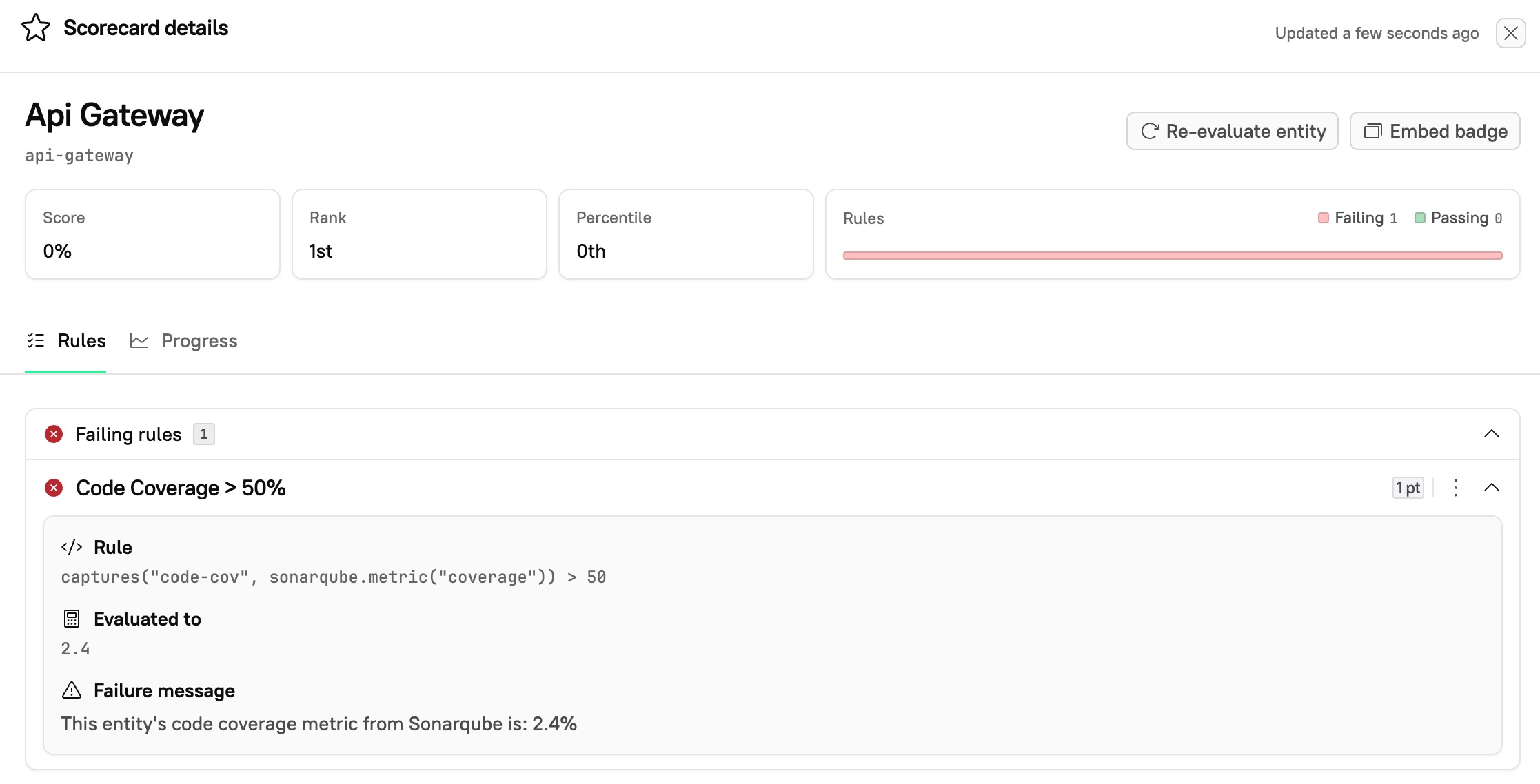
1. Decide what data to show in the failure message. In this example, we want to display the code coverage metric reported by SonarQube.
2. While [configuring a Scorecard](/standardize/scorecards/create#step-1-configure-the-basic-scorecard-fields), add a rule using a CQL capture. Use a CQL expression to capture the code coverage metric and apply a threshold:<br />
   `captures("code-cov", sonarqube.metric("coverage")) > 50`
3. Customize the rule’s **Failure message** field to include the captured value. This message will appear when the rule fails (i.e., when coverage is 50% or lower):

```
This entity's code coverage metric from Sonarqube is:
{{context.evaluation.captures.code-cov}}%
```

4. After evaluation, view the Scorecard details. Navigate to the entity that failed the rule. Expand the failure message to view the captured code coverage value.

<img src="https://mintcdn.com/cortex-290c0c42/qRY2zZcIyXqFVeCq/guides/images/zight-2025-05-23-at-2-34-09-pm.jpg?fit=max&auto=format&n=qRY2zZcIyXqFVeCq&q=85&s=cb263e83d57be56ce094c524b2d10790" alt="" width="2234" height="1138" data-path="guides/images/zight-2025-05-23-at-2-34-09-pm.jpg" />


## Related topics

- [SonarQube](/ingesting-data-into-cortex/integrations/sonarqube.md)
- [Seasonal readiness Scorecard](/guides/production-readiness/seasonal-readiness-scorecard.md)
- [Scorecard examples](/standardize/scorecards/scorecard-examples.md)