# Trigger internal Jenkins jobs

You can use [Cortex Workflows](/streamline/workflows.md) and [Axon Relay](/ingesting-data-into-cortex/integrations/axon-relay.md) to trigger Jenkins jobs running inside your private network without exposing your CI/CD tools to the public internet. This guide walks you through setting up a Docker-based Jenkins instance, configuring Axon Relay to communicate with it securely, and building a Workflow that listens for the job result via callback URL.

### Prerequisites

Before getting started:

* Create a [Cortex API token](/configure/settings/api-keys.md).
* You should have the following tools installed locally:
  * [Docker](https://docs.docker.com/get-docker/)
  * [Docker Compose](https://docs.docker.com/compose/install/)
* You should have [Jenkins](https://hub.docker.com/r/jenkins/jenkins) configured (used via Docker container in this guide).

### **Considerations**

* This guide describes using a Docker compose file, but note that Axon Relay can be run in Kubernetes or other container systems.

### Step 1: Configure Jenkins

1. Start a basic Jenkins instance in Docker:

```bash
docker run -p 9090:8080 -p 50000:50000 jenkins/jenkins:lts
```

2. Once Jenkins starts, follow the UI to unlock and configure it. [Create a new job](https://www.jenkins.io/doc/book/pipeline/getting-started/#through-the-classic-ui), and use the following example simple pipeline:

{% hint style="info" %}
This script includes a `Hello World` stage for lightweight setup and testing. Replace it with your own build, test, or deployment logic.
{% endhint %}

{% code fullWidth="false" %}

```
pipeline {
    agent any
    
    parameters {
        string(
            name: 'callbackURL',
            defaultValue: '',
            description: 'The callback URL to POST to'
        )
    }
    
    stages {
        stage('Hello World') {
            steps {
                echo 'Hello World'
            }
        }
        
    }
    
    post {
        always {
            script {
                if (params.callbackURL?.trim()) {
                    def status = currentBuild.currentResult ?: 'SUCCESS'
                    def message = ""
                    def statusCode = ""
                    
                    if (status == 'SUCCESS') {
                        message = "Pipeline completed successfully"
                        statusCode = "success"
                    } else {
                        message = "Pipeline failed during execution"
                        statusCode = "failure"
                    }
                    
                    withCredentials([string(credentialsId: 'cortex_api_token', variable: 'API_TOKEN')]) {
                        sh """
                            curl -X POST "${params.callbackURL}"\
                                 -H "Content-Type: application/json" \
                                 -H "Authorization: Bearer \${API_TOKEN}" \
                                 -d '{
                                     "status": "update",
                                     "message": "${message}",
                                     "response": {
                                     "build_number": "${env.BUILD_NUMBER}",
                                     "job_name": "${env.JOB_NAME}",
                                     "timestamp": "'"\$(date -Iseconds)"'"}
                                 }' \
                                 --fail \
                                 --show-error
                                 
                            curl -X POST "${params.callbackURL}"\
                                 -H "Content-Type: application/json" \
                                 -H "Authorization: Bearer \${API_TOKEN}" \
                                 -d '{
                                     "status": "${statusCode}",
                                     "message": "${message}"
                                 }' \
                                 --fail \
                                 --show-error
                        """
                    }
                    echo "Sent ${statusCode} notification to ${params.callbackURL}"
                } else {
                    echo "No callback URL provided, skipping POST request"
                }
            }
        }
        
        failure {
            echo "Pipeline failed!"
        }
        success {
            echo "Pipeline completed successfully!"
        }
    }
}
```

{% endcode %}

### Step 2: Set up and run Axon Relay

To call a Jenkins instance behind a firewall, you’ll need to run the [Cortex Axon Relay](/ingesting-data-into-cortex/integrations/axon-relay.md) locally or within your infrastructure.

#### **Step 2.1: Create the `.env` file**

In your project directory, create a file called `.env`. It should include:

```env
CORTEX_API_TOKEN=<your_cortex_api_token>
JENKINS_URL=<https://your.jenkins.url>
JENKINS_TOKEN=<admin:your_jenkins_api_token>
```

Make sure these environment variables match the configuration of your Jenkins instance.&#x20;

{% hint style="info" %}
If Jenkins and Axon are running on the same machine, Axon Relay may have issues reaching Jenkins using `http://localhost` or `127.0.0.1`, since those addresses refer to the container’s internal network.

A  workaround is to use a tunneling service like [ngrok](https://ngrok.com/) to expose Jenkins with a public HTTPS URL. If you do so, use the generated public HTTPS URL as the value for `JENKINS_URL`.
{% endhint %}

#### **Step 2.2: Create `accept.json`**

In your project directory, create a file called `accept.json`, which controls what endpoints the Relay is allowed to forward requests to:

```
{
  "private": [
    {
      "method": "any",
      "path": "/*",
      "origin": "${JENKINS_URL}",
      "auth": {
        "scheme": "basic",
        "value": "${JENKINS_TOKEN}"
      }
    }
  ]
}
```

#### **Step 2.3: Create `docker-compose.yml`**

The `docker-compose.yml` file defines how to run the Cortex Axon agent (Relay) using Docker Compose. This file tells Docker how to configure and launch the Relay service so it can securely connect to your internal Jenkins instance and communicate with Cortex.

In your project directory, create the following file:

```yaml
services:
  jenkins-relay:
    image: ghcr.io/cortexapps/cortex-axon-agent:latest
    env_file: .env
    volumes:
      - "./accept.json:/app/accept.json:rw"
    command: [
      "relay",
      "-a", "jenkins-relay",  # This must match the alias used in the Workflow block
      "-f", "/app/accept.json"
    ]
```

#### **Step 2.4: Run Axon Relay**

From your terminal, run:

```bash
docker compose up
```

Axon Relay will start and register with Cortex using your API token.

### Step 3: Create the Workflow in Cortex

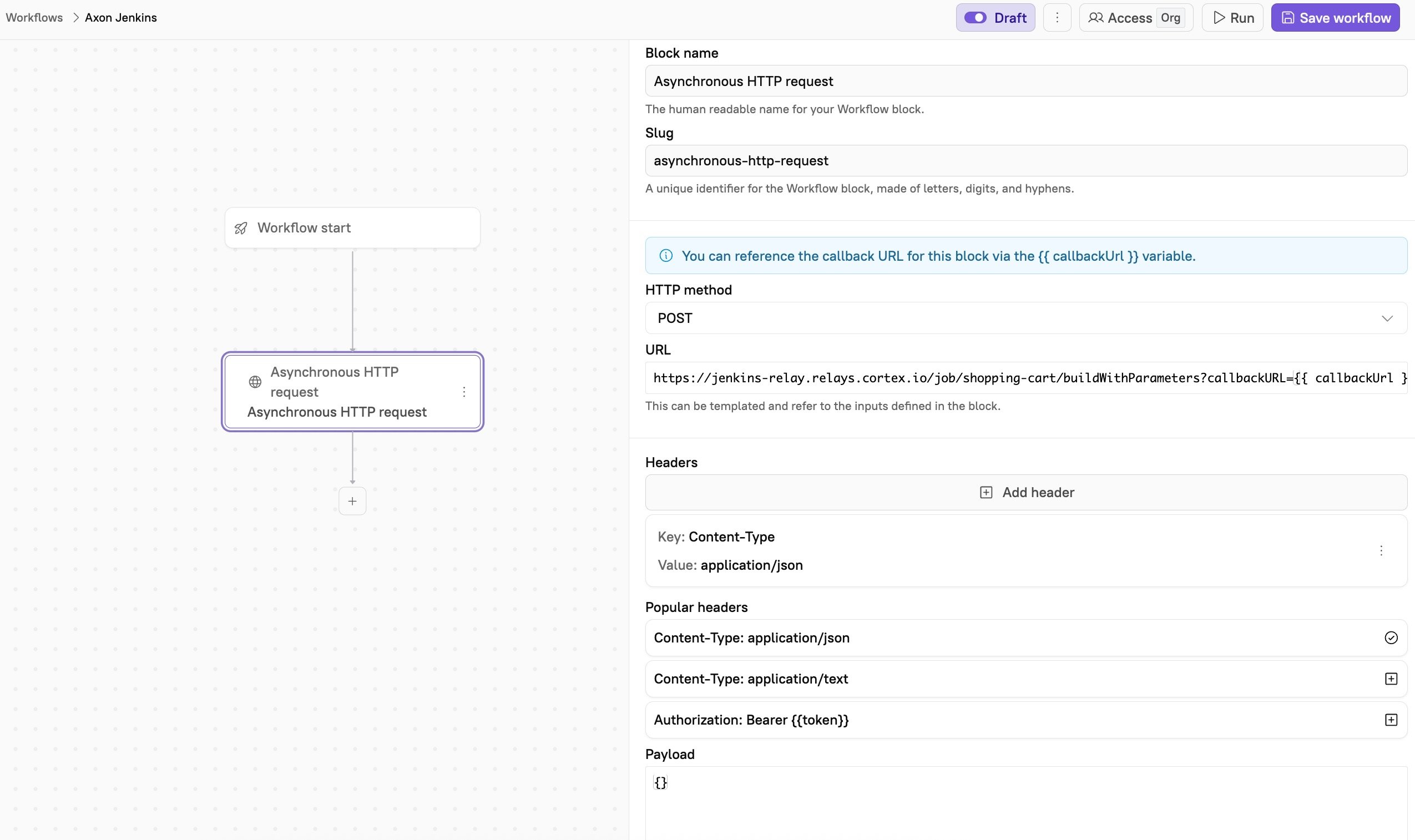
1. Follow the steps to [start creating a Workflow](/streamline/workflows/create.md) and [configure its basic details](/streamline/workflows/create.md#step-2-configure-your-workflow-settings).
2. Add an [**Async HTTP request**](/streamline/workflows/blocks.md#http-action-async) block to your Workflow. Configure the block:
   * **Block name**: Enter a descriptive name, e.g., `Trigger Jenkins job`.
   * **Slug**: Enter a unique identifier for the block.
   * **HTTP method**: `POST`
   * **URL**: Enter the relay URL for your Jenkins job, in the following format:\
     `https://<relay-alias>.relays.cortex.io/job/<jenkins-job-name>/buildWithParameters?callbackURL={{callbackUrl}}`
     * Replace `<relay-alias>` with the alias you assigned to the Relay in your `docker-compose.yml` file (e.g., `jenkins-relay`).
     * Replace `<jenkins-job-name>` with the name of the job you want to trigger in Jenkins.
     * `{{callbackUrl}}` is a dynamic value provided by Cortex and required for async blocks.
3. Save the block.
4. In the upper right corner of the page, click **Save Workflow**.

<figure><img src="/files/9tpzL9faqQOHvACQQx3n" alt=""><figcaption></figcaption></figure>

### Step 4: Run the Workflow

* Click **Run** on your Workflow.

{% hint style="success" %}
Learn more about Workflow runs in [Running a Workflow](/streamline/workflows/run.md).
{% endhint %}

When you run the Workflow, the following actions happen:

1. Cortex will POST to Jenkins via Axon.
2. Jenkins starts the job and makes two POSTs back to Cortex:
   * One `update` while in progress.
   * One `success` or `failure` when done.
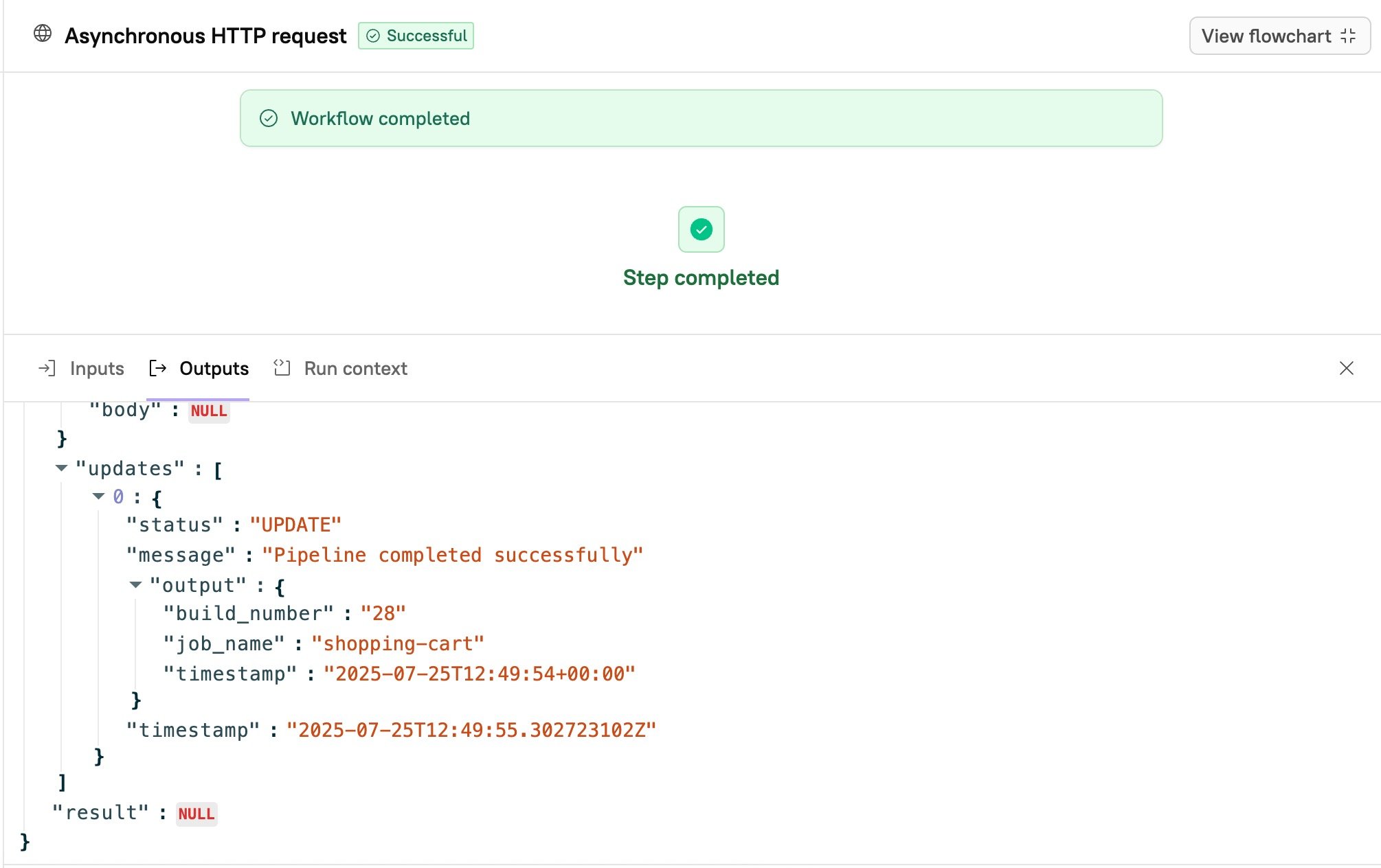
3. The Workflow resumes and displays output in the **Async HTTP** block results:
   * Metadata about the initial outbound request to Jenkins (e.g., status, headers)
   * A callback with the job name, build number, and timestamp
   * A final result with success or failure
<figure><img src="/files/Lps3r5I2D3Cz0qPHw8do" alt=""><figcaption></figcaption></figure>


---

# Agent Instructions: Querying This Documentation

If you need additional information that is not directly available in this page, you can query the documentation dynamically by asking a question.

Perform an HTTP GET request on the current page URL with the `ask` query parameter:

```
GET https://docs.cortex.io/guides/operational-readiness/jenkins-axon.md?ask=<question>
```

The question should be specific, self-contained, and written in natural language.
The response will contain a direct answer to the question and relevant excerpts and sources from the documentation.

Use this mechanism when the answer is not explicitly present in the current page, you need clarification or additional context, or you want to retrieve related documentation sections.