# Call internal service endpoints in a Workflow
Your organization may have services that are not publicly accessible but contain information that would be useful to manage in Cortex. You can use an [HTTP action in a Workflow](https://app.gitbook.com/o/RD51qiGImxmmq8NjALb1/s/JW7pYRxS4dHS3Hv6wxve/streamline/workflows/create#http-request) and [Cortex's Axon Relay](https://app.gitbook.com/o/RD51qiGImxmmq8NjALb1/s/JW7pYRxS4dHS3Hv6wxve/ingesting-data-into-cortex/integrations/axon-relay) to call internal services without exposing the service or authentication outside of your firewall.
### How to call internal service endpoints in a Workflow
#### Prerequisites
Before getting started, you should have already [set up the Cortex Axon agent](https://app.gitbook.com/o/RD51qiGImxmmq8NjALb1/s/JW7pYRxS4dHS3Hv6wxve/ingesting-data-into-cortex/integrations/axon-relay) and [set your Cortex API token in the .env file](https://app.gitbook.com/o/RD51qiGImxmmq8NjALb1/s/JW7pYRxS4dHS3Hv6wxve/ingesting-data-into-cortex/integrations/axon-relay#step-1.2-create-a-.env-file-and-a-docker-compose.yml-file).
**Considerations**
* This guide describes using a Docker compose file, but note that Axon Relay can be run in Kuberenetes or other container systems.
* As an example throughout this guide, assume a service in the network has the following endpoint:
`GET http://cities.internal.my-company.com/api/cities/s => ["Seattle", "Sydney", "Shanghai" ...]`
#### Step 1: Create request forwarding configuration
* Create a file that defines how requests are routed.
* The example below permits any requests, but note that the `method` and `path` can be narrowed to allow access to specific endpoints:
```
{
"private": [
{
"method": "any",
"path": "/*",
"origin": "http://cities.internal.my-company.com"
}
]
}
```
#### Step 2: Configure Axon Docker container
1. Create an accept file (in this example, `docker-compose.yml`) that defines how the container will route traffic and which routes are allowed.
* For production employments, two replicas should be specified. The example below can be used to test the system.
```
services:
relay-cities:
image: ghcr.io/cortexapps/cortex-axon-agent:latest
environment:
HOSTNAME: relay-cities-${HOSTNAME:-local}
CORTEX_API_TOKEN: $CORTEX_API_TOKEN
volumes:
- "./accept.cities.json:/app/accept.json"
command: [
"relay",
"-a", "axon-relay-cities", # this can be any unique value
"-f", "/app/accept.json",
]
```
2. Start the container, which will register it with Cortex: Run the command `docker compose up`.
#### Step 3: Create the Workflow in Cortex
1. Follow the [steps to start creating a Workflow](https://app.gitbook.com/o/RD51qiGImxmmq8NjALb1/s/JW7pYRxS4dHS3Hv6wxve/streamline/workflows/create#step-1-choose-a-template-or-a-blank-workflow) and [configure its basic details](https://app.gitbook.com/o/RD51qiGImxmmq8NjALb1/s/JW7pYRxS4dHS3Hv6wxve/streamline/workflows/create#step-2-configure-your-workflow-settings).
2. Add an HTTP request block to your Workflow. Configure the block:
* **Block name**: Enter a human readable name.
* **Slug**: Enter a unique identifier for the block.
* **HTTP method**: GET
* **URL**: Enter a URL in the following format: `http://[your-configuration-alias]@relay-proxy.cortex.io[/desired/url/path]`
* For the example from this guide, it would be `http://axon-relay-cities@relay-proxy.cortex.io/api/cities/s`
* **Headers**: For more information on headers, see the [HTTP request block documentation](https://app.gitbook.com/o/RD51qiGImxmmq8NjALb1/s/JW7pYRxS4dHS3Hv6wxve/streamline/workflows/create#http-request).
3. After saving your changes, run the Workflow.
* Click **Run** at the top of the Workflow.
* Learn more about Workflow runs in [Running a Workflow](https://app.gitbook.com/o/RD51qiGImxmmq8NjALb1/s/JW7pYRxS4dHS3Hv6wxve/streamline/workflows/run).
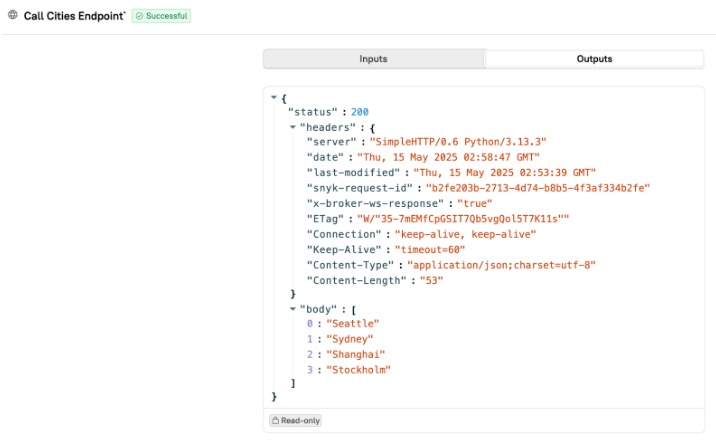
After running the Workflow, check its **Outputs** for the "Call cities endpoint" data: